
Edit Text in Images Effortlessly with Bylo.ai: The AI Solution You’ve Been Waiting For
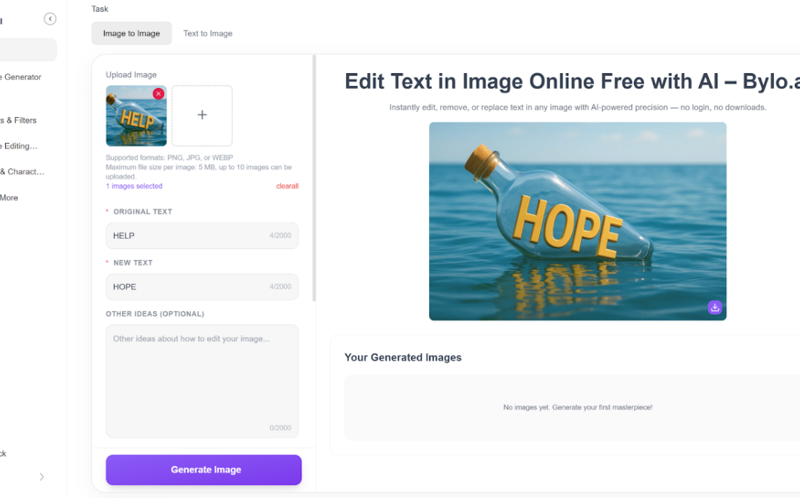
Anyone who works with images knows how challenging it can be to edit text in photos, especially when it comes to maintaining the original layout and font. Whether you’re designing social media posts, creating marketing materials, or simply modifying personal photos, editing text in images can often become a frustrating, time-consuming task.
I’ve been there. Using clunky design software or relying on basic editing tools just doesn’t cut it—especially when you need the edited text to match the original font and structure. But then I found Bylo.ai, and everything changed.
Unlike basic photo editors, Bylo.ai is an AI image text editor that not only allows you to edit text in images but does so intelligently. The AI ensures that the text looks natural and seamless, even when it’s updated with the same font, size, and color. Whether you’re a designer, marketer, or even someone working on personal projects, Bylo.ai simplifies the process and makes image text editing a breeze.
Why Editing Text in Images Has Always Been a Struggle
Anyone who has tried to edit image text using traditional methods knows that it can be a huge headache. Basic tools often fail to maintain the integrity of the original design—leading to mismatched fonts, broken layouts, or distorted text. Even more advanced software can be complicated to use and time-consuming, especially if you’re not a professional designer.
What sets Bylo.ai apart is that it uses advanced AI image editing technology to tackle these issues. The AI image editor is designed to edit text in images effortlessly, maintaining the visual consistency of the original design. This means you can focus more on your creative process and less on the technical challenges of image text editing.
How Bylo.ai’s AI Image Text Editor Works
Quick and Easy Online Text Editing
Bylo.ai makes image text editing incredibly fast and straightforward. There’s no need for complex software installations or design skills—simply upload your image, edit the text, and the AI handles the rest. The platform works entirely online, meaning you can quickly and easily edit text in images from anywhere, at any time. Whether you’re on the go or working from the office, Bylo.ai lets you make professional-quality text edits in just a few clicks, saving you both time and effort.
Context-Aware AI-Powered Text Removal
One of the standout features of Bylo.ai‘s is its ability to remove text from images with precision, using its AI-powered text removal feature. Instead of manually cropping or deleting text, Bylo.ai’s edit text in image AI detects and removes unwanted text while ensuring the surrounding image remains intact. Whether you’re cleaning up an image or preparing it for new content, the process is smooth and fast. This allows you to start with a clean canvas without losing the integrity of the image.
Maintain Visual Consistency with AI Image Text Editor
When you edit text in images, maintaining the visual consistency of the original design is crucial. Bylo.ai’s AI technology ensures that the overall layout, font, and style remain true to the original. The AI doesn’t just change the text—it analyzes the structure of the entire image, making sure the placement and formatting stay consistent. Whether you’re replacing a few words or updating an entire section, Bylo.ai guarantees that the final result matches your design seamlessly, keeping everything in place as if the changes were made by a professional designer.
Edit Text in Image with the Same Font
One of the most difficult tasks when editing text in images is ensuring the new text matches the original font. With Bylo.ai, this is no longer a challenge. The AI intelligently analyzes the original font, style, and size, allowing you to edit text in image with the same font effortlessly. No more worrying about mismatched fonts or adjusting settings manually—Bylo.ai automatically ensures that your new text fits perfectly within the existing design.
Real-World Example: How Bylo.ai Changed My Design Process
A few weeks ago, I was working on a social media campaign for a client. I had to update some text on a promotional flyer, but the original font and layout were crucial to the design’s success. Normally, I would have spent hours fiddling with the text, trying to match the font and positioning manually. But with Bylo.ai, I simply uploaded the image, made the necessary text changes, and the edit text in image AI automatically updated the text—keeping everything in place and consistent with the original design.
The result was seamless. I didn’t have to spend time adjusting fonts or re-aligning the text; everything was done automatically. This saved me hours of work and allowed me to focus on other creative aspects of the campaign.
How to Edit Text in Images Free Online with Bylo.ai
Editing text in images has never been easier with Bylo.ai. Follow these three simple steps to start editing your images with AI-powered precision:
Visit the Bylo.ai Website
Head over to the Bylo.ai website to get started. The platform is fully online, so there’s no need to download or install anything. Simply visit the homepage, and you’ll be ready to begin editing image text with the power of AI in just a few clicks.
Upload Your Image
Once you’re on the site, upload the image that you want to edit. Whether it’s a product image, social media post, or marketing material, Bylo.ai accepts a variety of image formats. Simply drag and drop your image, and the AI will automatically analyze it, ready for text editing.
Wait for Edit Text in Image AI to Generate Your Edited Image
After uploading, Bylo.ai will process your image and edit the text automatically. The AI image text editor works quickly, typically taking only a few minutes to make the necessary changes while preserving the original font and layout. Once the process is complete, you can preview the edited image and download it for use.
Edit Text in Images AI with Ease Using Bylo.ai
If you’ve ever struggled with editing text in images, Bylo.ai provides a quick, efficient solution that eliminates the frustration of using clunky software or manually adjusting fonts. Whether you’re a professional designer, a marketer, or someone working on personal projects, Bylo.ai makes image text editing effortless by maintaining visual consistency and ensuring the new text matches the original font and style.
Bylo.ai’s AI image text editing technology makes it easy to edit text in image quickly and accurately, so you can focus on the creative aspects of your projects without worrying about technical details.