
Why Starting With a Picture Beats Starting From Scratch
For anyone who has spent more than a few hours wrestling with AI image tools, a familiar pattern emerges. You type a prompt, wait, and receive something that looks nothing like what you imagined. You tweak the wording, wait again, and the result drifts further from your original intention. Text-to-image generation is remarkable technology, but it suffers from a fundamental problem: words are imprecise. Describing a composition, a camera angle, or a specific product detail in text alone is like trying to draw a portrait using only a telephone. That is precisely why Image to Image has become one of the more interesting developments in the generative AI space. The premise is simple but powerful: instead of asking the AI to invent something from nothing, you give it a visual foundation and ask it to build from there.
Why Image-to-Image Changes the Creative Equation
Most visual work does not start with a blank canvas. It starts with a photo, a sketch, a product shot, or a design draft that is already close but not quite ready. A marketer has a product image but needs it in a different setting. A designer has a rough layout but wants to see it in multiple styles. A content creator has a portrait but wants a cinematic version for social media. In all of these cases, the source image already contains critical decisions: subject placement, framing, color palette, and mood. Abandoning that structure to start from text alone wastes a valuable creative asset.
Image-to-image AI addresses this by treating the uploaded picture as a blueprint. The system reads the existing composition, identifies the subject and its key features, and then applies the transformation described in the prompt. The original image becomes an anchor—the AI preserves the core structure and important details while applying the changes you specify. From a practical user perspective, this workflow feels closer to creative direction than random generation. You are not hoping the AI understands what you mean; you are showing it exactly what you have and steering it toward a new outcome.
Behind the Workflow: How Image-to-Image Actually Runs
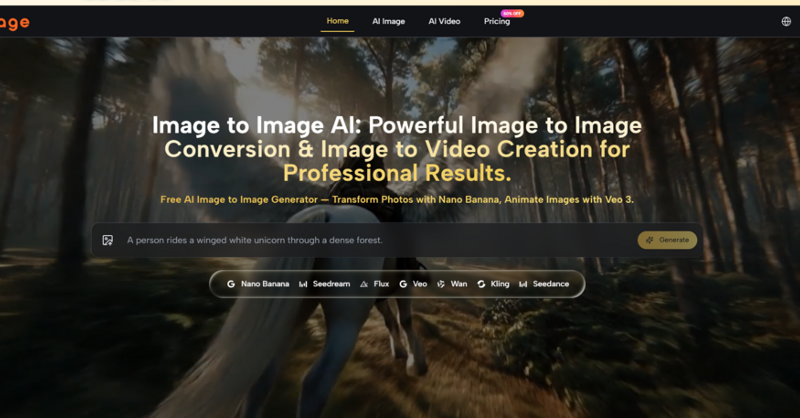
The platform’s image-to-image workflow follows a straightforward upload-and-generate process, common to tools in this space but executed with unusual clarity.
Step One: Upload Your Source Material
The Starting Point Is Visual
The first step is providing a source image. This can be a photo, a design draft, a product visual, a character concept, or any other image that gives the system something concrete to transform. The platform supports standard formats including JPG, JPEG, PNG, and WEBP, with a generous 24MB limit per file and support for up to five reference images in a single generation. The ability to upload multiple references is particularly useful for maintaining brand consistency or character continuity across a series of outputs. A clean, readable source image is more likely to produce better results.
Step Two: Describe the Transformation
Precision in the Prompt
The prompt box is where you define the direction of change. This is not a simple “make it better” button. The AI responds to specific instructions. Effective prompts describe what should change—style, background, lighting, mood, or specific elements—while implying what should stay the same. For example, “convert this portrait into a cyberpunk illustration with neon highlights” is more useful than “change the style.” The platform provides example prompts that demonstrate this level of detail, showing that the underlying models are capable of understanding complex compositional instructions. The prompt remains visible and editable across generations, which reduces the friction of re-entering instructions when iterating through variations.
Step Three: Select the Right Model for the Job
Matching the Task to the Engine
This is the critical decision point. Instead of pushing every job through one generic engine, the platform offers distinct model paths for different visual intentions. Nano Banana serves as the core image-to-image engine, positioned around hyper-realistic transformation, style transfer, detail retention, and consistency support through multiple reference images. It is the model most users will encounter first, addressing the central promise of image-to-image work: take an existing image, preserve what matters, and push it toward a different visual result. Flux is designed for context-aware editing and photorealism. Seedream prioritizes speed for rapid iteration and experimentation. Each model has a distinct role rather than being an interchangeable label. The platform makes these differences visible early in the workflow, which lowers decision fatigue.
Step Four: Generate and Evaluate
Speed and Output Options
After clicking generate, the platform produces results typically within six to twelve seconds for a standard image. The output supports multiple aspect ratios including 1:1, 16:9, and 9:16, with resolutions up to 4K. The generation history remains accessible across sessions without requiring local storage, which addresses the specific pain point of losing client-approved work after clearing a browser cache.
Testing Image-to-Image Across Real Scenarios
The platform’s value becomes clear not through benchmark scores but through how it performs across different creative tasks.
Product Photography: From Flat Shot to Lifestyle Visual
One of the most common image-to-image use cases is transforming a simple product photo into lifestyle imagery suitable for e-commerce or marketing. In testing, uploading a phone-taken product shot with flat lighting and a white background and prompting for a sunlit kitchen counter with contextual props and natural shadows produced a result that preserved the product’s shape, label text, and proportions while replacing the background and adding realistic environmental lighting. The system analyzed the source photo and generated a new version that kept the product intact. This is precisely the kind of task that often breaks weaker systems—they either ignore product details entirely or hallucinate objects that do not belong.
Limitation noted: The result was not a photorealistic studio shot every time. Some generations introduced subtle distortions on fine typography. After three rounds of prompt refinement, however, the output passed as usable marketing material. The model’s support for up to four reference images meant uploading additional shots of the same product from different angles could strengthen the AI’s understanding of what to preserve.
Sketch Refinement: Respecting the Blueprint
A more demanding test involved uploading rough sketches and asking for polished digital paintings while keeping the composition and proportions exactly as shown. Many AI tools treat a reference sketch as a loose suggestion rather than a blueprint, and the results often abandon the composition, proportion, or emotional intent of the original. In this test, the image-to-image model treated the sketch like a layout that deserved to be preserved. The cliff stayed on the left, the house stayed small against the sky, and the sea retained the churning character of the original pencil strokes. This structural fidelity—keeping the horizon line, the relative sizes, and the spatial relationships—is what separates a useful image-to-image tool from one that merely produces attractive but unrelated images.
Iterative Refinement: Consistency Across Generations
For content teams producing multiple variations of a single asset, the ability to iterate without losing context is critical. In testing, the platform’s generation panel kept the previous prompt visible and editable, and when switching between available models, the prompt stayed intact. This continuity reduced the time spent re-typing and re-thinking from perhaps thirty seconds per iteration to five. When generating fifty images a week, that saving in cognitive energy becomes meaningful. The image history remained accessible across sessions, allowing users to scroll back to previous generations, pick a variant they had overlooked, and download it again without drama.
A Practical Comparison: Image-to-Image vs. Text-to-Image
| Aspect | Image-to-Image Workflow | Text-to-Image Only |
| Starting Point | Existing visual asset provides structure and reference | Blank prompt requires describing everything in words |
| Control Over Composition | High; source image anchors subject placement and framing | Low; composition is probabilistic and often unpredictable |
| Iteration Speed | Faster; prompt stays editable, history remains accessible | Slower; each generation may require re-entering the full prompt |
| Consistency | Better with multiple reference images | Inconsistent; same prompt can produce wildly different results |
| Best Use Case | Product visualization, brand assets, sketch refinement, style transfer | Conceptual exploration, generating from scratch |
Where Image-to-Image Falls Short
No tool is without limitations, and the image-to-image workflow has specific constraints worth acknowledging.
Prompt Quality Still Matters: A source image does not remove the need for good prompting. It simply gives the prompt a stronger foundation. If the instruction is vague, the result may still drift. If the instruction is specific but unrealistic, the output may not match the user’s intention. Users should expect to refine their prompts across multiple generations to achieve the best results.
Model Choice Requires Judgment: The platform provides multiple model paths, but it does not choose the best one for you. That decision requires some experimentation. A user might need to generate the same prompt across Nano Banana, Flux, and Seedream to determine which produces the best result for their specific needs. First-time users may find the model selector confusing.
Complex Edits May Need Multiple Attempts: While the platform handles many tasks well, extremely complex scenes with multiple interacting elements or very specific anatomical poses may require several generations to get right. The ability to generate multiple options mitigates this, but it is not a one-click solution for perfection.
Results Vary by Task: Not every model excels at every task. AI Image to Image gives you the tools, but the output quality depends heavily on which model is used for which task. Some users may need several generations before landing on the best version.
Who Benefits Most From Image-to-Image?
Based on testing and the platform’s design, the image-to-image workflow is best suited for:
Marketing and E-Commerce Teams who need to generate multiple visual variations of product shots without reshooting. The ability to preserve product details while changing backgrounds, lighting, and settings accelerates campaign creation.
Designers and Art Directors who start with sketches or layouts and want to explore different styles, color palettes, or finishes while keeping the core composition intact.
Content Creators producing consistent character art, brand mascots, or series visuals where maintaining visual continuity across multiple images is essential.
Freelancers and Agencies managing multiple client projects with different visual requirements. Having access to multiple models in one interface avoids the need for separate subscriptions to different tools.
The generative AI space continues to evolve rapidly, but the fundamental challenge remains the same: turning a creative vision into a usable image. Image-to-image addresses this by honoring what already exists—the photos, sketches, and assets that already contain the essential decisions—and using AI to extend, transform, and refine them. That approach, tested across real projects, offers a more controlled and predictable path from concept to deliverable than starting from a blank prompt.