
Effortless Subtitling: CapCut’s Automatic Tools
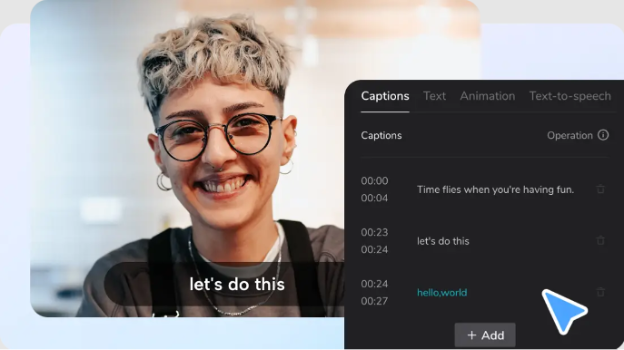
Creating engaging video content requires many skills. Adding subtitles is among the most important. Modern viewers often watch without sound. They need text to understand your message. Subtitles make videos accessible to everyone. They help viewers with hearing impairments. They assist non-native speakers too.
Why Subtitles Matter for Content Creators
Content creators face numerous challenges daily. Maintaining viewer attention is increasingly difficult. People scroll quickly through their feeds. They make split-second decisions about what to watch.
Subtitles can significantly increase view time. Research shows subtitled content gets more engagement. Viewers stay longer when they can read along. This improves your content’s performance on platforms.
Accessibility isn’t just nice to have anymore. It’s becoming essential for creators. More platforms are prioritizing inclusive content. Subtitles play a key role in this trend.
Many viewers watch in public places. They might be on buses or in waiting rooms. Often they can’t turn on sound. Without subtitles, they’ll scroll past your video. With subtitles, you capture their attention immediately.
Video editing software has evolved to meet these needs. Modern tools make adding subtitles much easier. They save creators valuable production time. This allows for more focus on creative aspects.
Automatic Caption Generation: A Game Changer
Traditional subtitling is incredibly time-consuming. Creators would manually transcribe every word. They would painstakingly sync text with audio. A ten-minute video could take hours to subtitle.
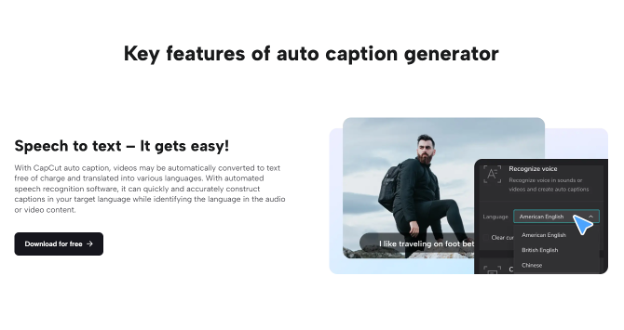
Automatic caption generation has transformed this process. Modern technology uses speech recognition algorithms. These systems convert spoken words to text automatically. They handle timing and synchronization too.
The quality of these systems has improved dramatically. Early versions produced many errors. Current technology offers impressive accuracy. This makes automatic captions a viable option for creators.
CapCut’s desktop editor includes powerful captioning tools. Their system can process various accents and dialects. It handles background noise better than many competitors. The result is remarkably accurate subtitles in minutes.
Using an AI caption generator saves enormous amounts of time. Creators can focus on other aspects of production. They can refine their message and visuals instead. This leads to higher quality content overall.
How To Add Automatic Subtitles in CapCut
Adding subtitles in CapCut requires a few simple steps. The process is intuitive and straightforward. Even beginners can master it quickly. Here’s how to get started:
Step 1: Install CapCut Desktop Editor
First, you’ll need the desktop version installed. Visit the official CapCut website. Look for the download option for your system. Follow the installation instructions carefully. Launch the program once installation completes.
The desktop version offers more features than other versions. It provides more processing power for complex tasks. This makes it ideal for working with subtitles. The interface is designed for efficiency and ease.
Step 2: Create a New Project
Open CapCut and start a new project. The interface is clean and intuitive. You’ll see various options for aspect ratios. Choose the one that matches your intended platform. Social media platforms have different requirements.
The project settings allow customization options. You can adjust resolution and frame rate. These settings affect your final output quality. Choose settings appropriate for your distribution platform.
Step 3: Import Your Video
Click the import button to add your video. Navigate to your video file location. Select the file and import it to CapCut. The video will appear in your media library.
Drag the video onto the timeline below. This places it in your working area. You can now begin the editing process. CapCut accepts various video formats for flexibility.
Step 4: Generate Automatic Captions
Navigate to the text tools section. Look for the auto caption option. Click it to begin the process. CapCut will analyze your video’s audio track.
Select your video’s primary language. This improves the accuracy of transcription. Click the generate button to start processing. The system will work through your entire video. This may take a few minutes depending on length.
When complete, subtitles will appear on your timeline. They’ll be synchronized with the audio automatically. Each caption appears at the right moment. This automatic timing is remarkably accurate.
Step 5: Edit and Refine Your Captions
Review the generated captions carefully. Look for any errors in transcription. Common names or technical terms might need correction. Fixing these errors ensures professional quality.
CapCut makes editing captions simple and intuitive. Click on any caption to modify its text. You can adjust timing with easy drag handles. This helps fine-tune synchronization with the audio.
The editor allows complete customization of appearance. You can change fonts for different moods. Adjust sizes for better readability. Modify colors to stand out against your video. Add backgrounds or borders for clarity.
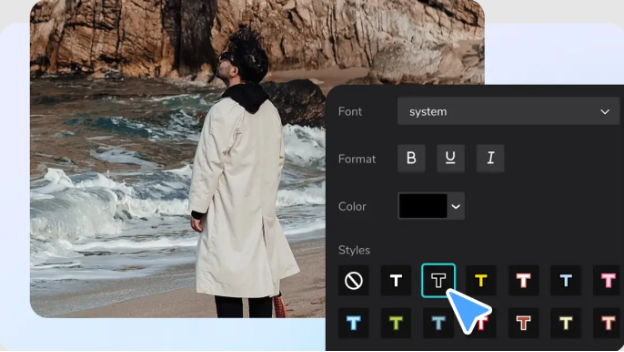
Consider your audience when styling subtitles. Ensure text is easy to read. Choose colors with good contrast. Keep fonts simple and clear. Professional subtitles enhance rather than distract.
Step 6: Format for Accessibility
Good subtitles follow certain conventions. They contain a limited number of characters per line. They stay on screen long enough to read. They don’t obscure important visual elements.
CapCut provides tools to maintain these standards. You can set maximum line lengths. You can adjust minimum display durations. These settings ensure comfortable reading for viewers. They maintain professional standards in your work.
Step 7: Export Your Completed Video
When your subtitles are perfect, export your video. Click the export button at the top right. Choose your desired format and quality settings. Higher quality settings produce larger files.
CapCut offers various export options for different needs. You can optimize for specific platforms. This ensures your video looks great wherever it’s shared. The export process preserves your subtitles exactly as designed.
Benefits Beyond Basic Accessibility
Subtitles offer advantages beyond helping those with hearing impairments. They improve comprehension for everyone. Complex topics become easier to follow. Viewers retain more information when reading and listening.
Search engines can index subtitled content. This improves discoverability online. Your videos are more likely to appear in relevant searches. This brings more viewers to your content.
Analytics show subtitled videos get more shares. They generate more comments too. This increases your content’s reach organically. It helps build your audience over time.
Educational content benefits tremendously from subtitles. Students can review complex explanations easily. They can study at their own pace. They don’t need to rewind repeatedly to catch missed words.
Conclusion: Elevate Your Content with Automatic Subtitles
Adding subtitles no longer requires extensive time investment. Modern tools have simplified the process dramatically. CapCut’s desktop editor stands out in this area. It combines accuracy with ease of use.
Creators at any level can now produce professional quality subtitles. The automatic generation handles the hardest parts. The intuitive editor makes refinements simple. The result is accessible content that reaches wider audiences.
As video consumption continues growing worldwide, subtitles become increasingly important. They break down language barriers. They make content accessible in diverse environments. They improve the overall viewing experience for everyone.
Start implementing automatic subtitles in your workflow today. Your viewers will appreciate the improved accessibility. Your metrics will reflect increased engagement. Your content will stand out in an increasingly crowded digital landscape.