
From Concept to Campaign: Using Nano Banana 2 to Turn Design Ideas into Visual Content
Visualizing architectural concepts accurately and efficiently is a critical part of modern design practice. From initial sketches and CAD plans to polished presentations for clients or marketing materials, transforming ideas into visuals often requires both technical expertise and significant time.
Nano Banana 2, powered by Gemini 3.1 Flash Image, supports architects and designers in bridging this gap. The Nano Banana 2 AI image generator converts sketches, plans, and textual prompts into high-quality visualizations while maintaining scale, texture fidelity, and realistic lighting. By combining precision, consistency, and multilingual text rendering, Nano Banana 2 allows design teams to focus on creativity and concept development rather than repetitive technical steps. Whether you are preparing client presentations, architectural proposals, or digital illustrations, this tool streamlines the workflow from concept to final visual output.
Speed and Efficiency: From Sketch to Marketing Visuals
Nano Banana 2 transforms rough concepts into polished visuals with remarkable speed and efficiency. Leveraging the Flash series technology, it accelerates rendering and iteration, enabling marketers and designers to quickly generate high-quality images without compromising on detail. Whether you’re creating social media posts, digital ads, or campaign graphics, Nano Banana 2 ensures rapid turnaround while maintaining professional visual standards, making it easier to meet tight deadlines and adapt to changing project needs.
Maintaining Consistency Across Design Elements
In complex projects with multiple characters and objects, maintaining consistency is critical. Nano Banana 2 preserves up to 5 character likenesses and 14 object fidelities within a single workflow, ensuring visual fidelity across scenes. This capability is especially valuable for brand materials, advertisements, and large-scale marketing campaigns, where repeated design elements must remain cohesive. By keeping visuals consistent, marketers and designers can save time on revisions while delivering a unified and professional appearance across all assets.
Advanced Text Rendering and Multilingual Localization for Designers
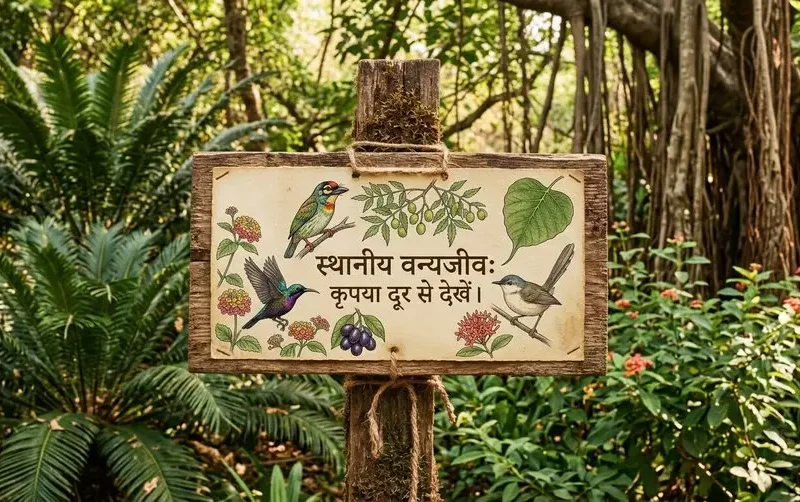
Nano Banana 2 excels in text rendering, allowing designers to place text accurately within images while preserving readability and style. Its multilingual localization feature supports content creation for multiple languages, ensuring consistency across international markets. Especially for font-intensive visual projects or social media campaigns, the tool allows designers to integrate text seamlessly, maintaining brand identity and visual harmony. The Google Nano Banana integration further enhances the tool’s ability to manage multilingual content efficiently, providing a reliable solution for global marketing efforts.
Flexible Resolutions and Aspect Ratios for Versatile Design
Nano Banana 2 now supports a new 512px resolution in addition to 1K, 2K, and 4K options, giving designers more flexibility to choose the optimal size for different projects. Combined with a wider range of aspect ratios, this allows marketing visuals, social media content, and web graphics to fit perfectly on any platform or medium. Whether creating vertical Instagram posts, widescreen banners, or detailed product mockups, Nano Banana 2 adapts effortlessly, ensuring each design maintains high visual fidelity and clarity. These enhancements help designers work faster while producing polished, platform-ready visuals without additional resizing or cropping.
Getting Started with Nano Banana 2 for Efficient Visual Design
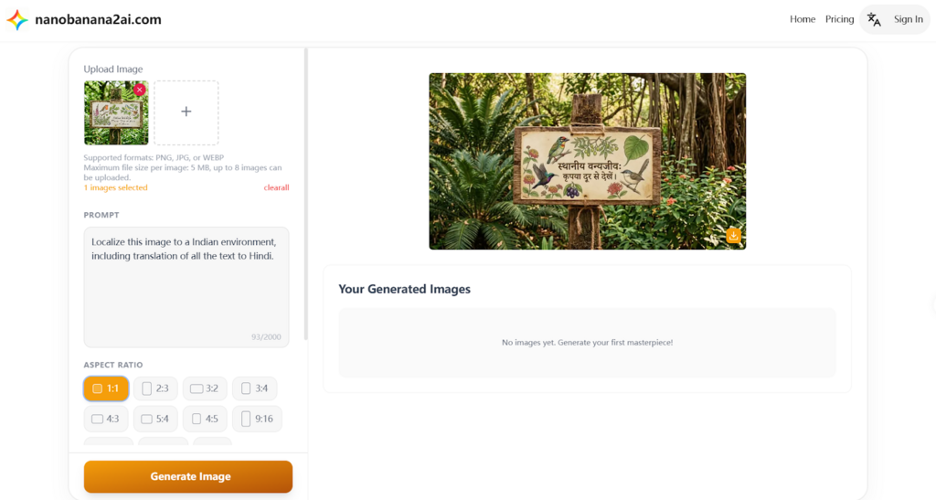
Step 1: Sign Up for a Free Account on NanoBanana.ai
Begin by visiting NanoBanana.ai to create a free account. Signing up provides access to the features of Nano Banana 2, including its Gemini 3.1 Flash Image technology for fast, precise image generation.
Step 2: Upload Images or Input Text Prompts
Once registered, you can either upload existing images from your device or use text prompts to generate new visuals. The Nano Banana 2 AI image generator/editor interprets your prompts with accuracy, producing high-quality images that match your marketing or design specifications.
Step 3: Customize and Refine Your Visuals
After generating an image, refine it with Nano Banana 2’s editing tools. Adjust elements such as lighting, textures, colors, and aspect ratios to ensure the visual fits your campaign or project needs. The platform’s precise instruction-following and consistency features help maintain visual fidelity across multiple iterations.
Use Cases: From Concept to Campaign on Nano Banana 2 AI Model
Creating Social Media Ads and Promotional Visuals
The Nano Banana 2 AI model enables marketers and designers to quickly generate attention-grabbing social media graphics. Whether it’s Instagram posts, Facebook ads, or banner campaigns, Nano Banana 2 delivers fast, high-quality visuals that are contextually accurate. Teams needing rapid turnaround benefit from Nano Banana 2’s speed, while campaigns requiring advanced customization may lean toward Nano Banana Pro for finer control.
Product Visuals and E-commerce Assets
For online stores and product promotions, Nano Banana 2 excels in creating detailed product images and mockups. Designers can generate realistic visuals for e-commerce platforms, marketing materials, or online catalogs. While Nano Banana 2 handles standard product visuals efficiently, Nano Banana Pro is better suited for high-resolution or highly customized product renderings that demand intricate edits.
Infographics and Marketing Materials
Designers can use Nano Banana 2 to quickly create visually compelling infographics, charts, and marketing collateral. The model leverages real-time data and global knowledge to ensure visuals are accurate and informative. For campaigns that require more granular design elements or multi-layered content, Nano Banana Pro offers the additional control necessary to fine-tune complex infographics.
Multi-Scene Animations and Storyboarding
When developing animations or multi-scene storyboards, maintaining consistency across characters, objects, and backgrounds is critical. Nano Banana 2 ensures visual continuity for standard projects with up to 5 characters and 14 objects, making it ideal for quick iterations. For larger projects with extensive customization needs, Nano Banana Pro provides advanced tools for scene-specific adjustments and refined control.
Turning Design Ideas into High-Impact Visuals with Nano Banana 2
Throughout the creative process, Nano Banana 2 AI model bridges the gap between concept and finished visual content by combining speed, precision, and consistency. From rapid social media graphics to detailed product visuals and infographics, marketers and designers can rely on the Nano Banana 2 AI model to generate high-quality, contextually accurate images. Its integration of Gemini 3.1 Flash Image ensures real-time data usage, consistency across multiple design elements, and precise adherence to prompts, making complex campaigns more manageable without sacrificing creative control.
Whether handling single-scene projects or multi-scene storyboards, Nano Banana 2 streamlines workflows, allowing teams to focus on creativity while maintaining professional visual fidelity. For projects requiring advanced customization, Nano Banana Pro remains the ideal choice, offering high-resolution outputs, enhanced localized editing, and greater control over complex designs. Together, these tools provide marketers with flexible solutions to translate ideas into engaging, platform-ready visuals efficiently.