
7 Best AI Image Upscalers for Preparing Midjourney Art for Large-Format Canvas Prints
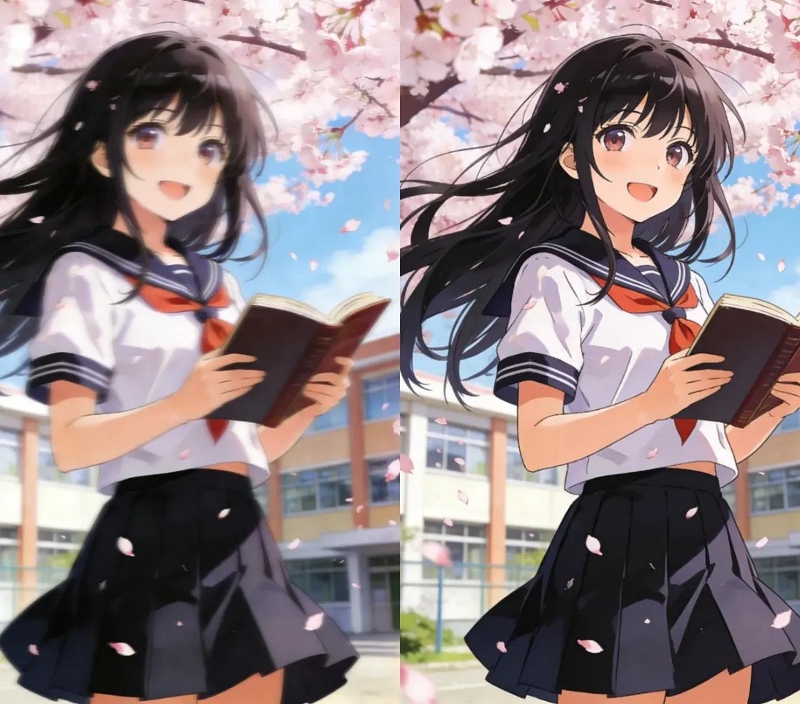
You’ve spent hours perfecting prompts in Midjourney and finally created a masterpiece. The colors are vibrant, the composition is perfect, and you can already imagine it hanging on your wall. There’s just one problem. The standard image resolution is great for a screen, but it will look blurry and pixelated when printed on a large canvas.
This is a common frustration for digital artists. Fortunately, you don’t have to abandon your vision for a large-format print. Modern AI tools can increase your image’s resolution, adding detail and sharpness to prepare it for printing. A powerful Image Upscaler uses machine learning to intelligently enlarge your art without the typical loss in quality. We’ve reviewed the top options to help you find the perfect tool for turning your digital creations into physical art.
Top 1: Topaz Gigapixel AI
Overview
Topaz Gigapixel AI is widely regarded as the industry leader for professional-grade image enlargement. It’s a standalone software application for Mac and Windows that uses deep learning to add stunning detail to your images. Instead of just stretching pixels, it analyzes the artwork and realistically recreates texture and fine details, making it a favorite among serious photographers and digital artists.
Key Features
* Five Specialized AI Models: Gigapixel offers different AI models tailored for various image types, including one for digital art and computer graphics.
* Face Recovery AI: This feature is incredibly useful for portraits, as it identifies and refines human faces to ensure they look sharp and natural after upscaling.
* Batch Processing: You can queue up multiple images to be processed at once, which saves a significant amount of time.
* Advanced Refinements: It provides sliders to control noise suppression and blur removal for maximum creative control.
Pros & Cons
* Pros: Produces unparalleled image quality with exceptional detail. Offers robust controls for professional adjustments. Works offline as a desktop application.
* Cons: Comes with a significant one-time cost. Requires a powerful computer to run smoothly. The interface can be complex for beginners.
Best For
Professional artists and photographers who demand the absolute highest quality and are willing to invest in premium software for their workflow.
Top 2: ImgUpscaler AI
Overview
For artists who need speed, convenience, and excellent results without the complexity of desktop software, ImgUpscaler AI is a fantastic choice. This web-based tool offers a streamlined process, allowing you to enlarge your Midjourney art in just a few clicks. It uses the latest AI technology to produce sharp and clean results suitable for printing. Its platform also includes a versatile AI Photo Editor for making further adjustments.
Key Features
* Fast and Simple Interface: The drag-and-drop system makes it incredibly easy to use. You can have an upscaled image ready in under a minute.
* Advanced AI Algorithm: The tool is specifically trained to handle digital art, cartoons, and photos, ensuring it preserves the unique style of your Midjourney creations.
* Batch Processing: The paid plans allow you to upload and process multiple images simultaneously.
* Free Tier: You can process a number of images for free each month, making it accessible for casual users or for testing before committing.
Pros & Cons
* Pros: Extremely user-friendly and fast. Fully web-based, so no software installation is needed. Generous free plan for occasional use.
* Cons: The free version limits the maximum size and number of upscales. Lacks the fine-tuning controls of professional desktop software.
Best For
Midjourney artists who want a quick, reliable, and high-quality online tool for preparing their art for canvas prints without a steep learning curve.
Top 3: VanceAI Image Upscaler
Overview
VanceAI offers a comprehensive suite of AI-powered photo editing tools, and its Image Upscaler is one of the most popular. This online tool is designed for convenience, providing specialized algorithms that cater to different types of images, including digital art. It can upscale images up to 8x while also enhancing details and reducing noise, making it a very versatile option.
Key Features
* Dedicated AI Models: VanceAI provides specific models for enlarging artwork, photos, and anime, which helps achieve better results for stylized Midjourney outputs.
* Integrated Toolkit: The upscaler is part of a larger ecosystem that includes a denoiser, sharpener, and colorizer.
* High-Resolution Output: It can enlarge images up to 800% of their original size while maintaining clarity.
* Workspace for Projects: Paid users get access to a workspace where they can manage multiple projects and use advanced workflows.
Pros & Cons
* Pros: Produces excellent, sharp results with its specialized models. The all-in-one toolkit is useful for more than just upscaling. The interface is clean and modern.
* Cons: The credit-based system for free users can be limiting. The best features and highest resolutions are locked behind a subscription.
Best For
Artists who need an all-in-one solution for various AI image enhancements in addition to high-quality upscaling for their prints.
Top 4: Let’s Enhance
Overview
Let’s Enhance is one of the more established names in AI image enhancement. This powerful web-based platform is built to handle serious upscaling jobs, offering enlargements up to 16x the original size. It’s an excellent choice for artists who plan on creating very large prints, such as wall murals or oversized canvases. It also includes tools for adjusting color and tone, giving you more control over the final look.
Key Features
* High-Magnification Upscaling: The ability to upscale images by 16x is a key differentiator, perfect for massive prints.
* Processing Presets: You can create and save custom presets to streamline your workflow for different types of Midjourney art.
* Color and Tone Correction: Built-in tools help you fix lighting and color issues before you send your art to the printer.
* Cloud Storage: Your uploaded and processed images are stored in the cloud, making them easy to access from any device.
Pros & Cons
* Pros: Capable of huge enlargements without significant quality loss. Offers useful pre-processing adjustments. Reliable and trusted service.
* Cons: Processing can be slower than some competitors, especially at high resolutions. The user interface feels a bit dated.
Best For
Digital artists who need to prepare their work for extremely large-format printing and value having presets for a consistent workflow.
Top 5: Upscale.media
Overview
Upscale.media is a straightforward, no-frills tool that focuses on one thing: making AI upscaling as simple as possible. Developed by the team behind Remove.bg, this tool is designed for speed and ease of use. You can upload your image, and the AI automatically enhances it to 2x or 4x its original size. It’s a great option for those who feel overwhelmed by complex settings and just want a quick, effective result.
Key Features
* One-Click Process: The tool is fully automated. You just upload the image, and it handles the rest.
* Artifact Removal: It’s particularly good at removing JPEG compression artifacts, which can be present in images saved from platforms like Discord.
* Mobile Apps: In addition to the web tool, it offers dedicated apps for both Android and iOS devices.
* Free to Use: The service is free for most standard uses, with a subscription available for higher resolution needs and batch processing.
Pros & Cons
* Pros: Incredibly simple and fast. Effectively cleans up compression artifacts. Free for basic upscaling needs.
* Cons: Limited to a maximum of 4x upscaling. Lacks any manual controls or advanced features.
Best For
Beginners or artists who need a fast, simple, and free solution for moderately sized prints without needing professional-level control.
Top 6: Bigjpg
Overview
Bigjpg is a specialized AI image upscaler designed with anime and digital illustrations in mind. Since many Midjourney creations have an illustrative or stylized aesthetic, Bigjpg can be a perfect match. It excels at enlarging images with clean lines and flat colors, preserving the sharpness of edges without introducing unwanted artifacts.
Key Features
* Illustration-Focused AI: Its algorithm is specifically trained on anime and illustrations, making it superior for non-photorealistic images.
* Noise Reduction: The tool includes a noise reduction feature optimized for digital art, which helps clean up any unwanted grain.
* High Upscale Limits: Paid users can upscale images up to 16x, while free users are limited to 4x.
* API Access: For developers or users with a highly technical workflow, Bigjpg offers API access to integrate its technology into other applications.
Pros & Cons
* Pros: Outstanding results for anime-style and illustrative Midjourney art. The free version is quite capable. Simple, uncluttered interface.
* Cons: Not as effective for photorealistic images. The free processing queue can be slow during peak times.
Best For
Artists whose Midjourney style leans heavily towards illustration, anime, or cartoons.
Top 7: Icons8 Smart Upscaler
Overview
Part of a larger suite of tools for designers, the Icons8 Smart Upscaler is another simple yet effective web-based option. It allows you to quickly upload and enlarge images up to 4x for free. The AI is fully automated and does a solid job of sharpening details and cleaning up imperfections during the upscaling process, making it a reliable tool for quick jobs.
Key Features
* Simple Interface: The tool is very straightforward, featuring a simple drag-and-drop upload area.
* Integrated Ecosystem: If you already use other Icons8 tools (like their icon library or photo stock), the upscaler fits neatly into that workflow.
* API Availability: Like Bigjpg, it offers API access for users who want to automate their upscaling process.
* Free Usage: You can upscale a limited number of images for free, with watermarks on some sizes unless you subscribe.
Pros & Cons
* Pros: Very easy to use. Part of a useful suite of design tools. The results are sharp and clean for most images.
* Cons: The free version has limitations on the number of images and may add a watermark. Upscaling is capped at 4x.
Best For
Designers and creators who are already familiar with the Icons8 ecosystem or need a quick, reliable upscaler for a few images.
Comparison Summary
Here’s a quick look at how these seven AI image upscalers stack up against each other.
| Tool | Max Upscale | Key Feature | Best For |
| Topaz Gigapixel AI | 6x (600%) | Professional-grade AI models | Professional artists |
| ImgUpscaler AI | 4x (400%) | Speed and ease of use | Quick online upscaling |
| VanceAI Image Upscaler | 8x (800%) | All-in-one enhancement suite | Artists needing multiple tools |
| Let’s Enhance | 16x (1600%) | High magnification & presets | Very large-format prints |
| Upscale.media | 4x (400%) | Simplicity & artifact removal | Beginners and fast results |
| Bigjpg | 16x (1600%) | Specialized for illustrations | Anime and illustrative art |
| Icons8 Smart Upscaler | 4x (400%) | Integration with design tools | Users of the Icons8 ecosystem |
Final Recommendation
Choosing the right AI image upscaler depends entirely on your needs, budget, and desired quality.
For the professional artist who needs flawless results for gallery-quality prints, Topaz Gigapixel AI is the clear winner. Its one-time cost is an investment in unparalleled quality and control.
For the majority of Midjourney users, ImgUpscaler AI provides the perfect balance of quality, speed, and simplicity. It’s a powerful online tool that delivers excellent results for canvas prints without requiring any technical expertise.
Finally, if your artistic style in Midjourney is heavily illustrative or anime-inspired, Bigjpg is specially designed to handle your work and will likely produce the cleanest and sharpest results.
No matter which tool you choose, using an AI upscaler is the essential final step to transform your digital art into a stunning physical piece you can proudly display.