
How AI Photo and Video Enhancers Help Designers Create Better Visual Content
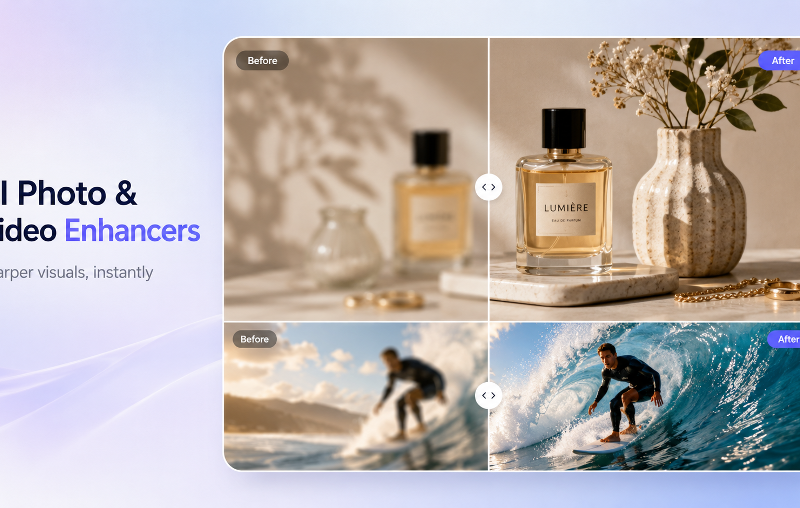
Design is no longer limited to typography, color palettes, and layout. Modern designers are expected to create complete visual experiences across websites, social media, ads, presentations, ecommerce pages, and video platforms. A strong font choice can define a brand’s personality, but the quality of the images and videos around that typography also plays a major role in how professional the final design feels.
For designers, marketers, and content creators, this creates a common challenge: not every image or video asset arrives in perfect condition. Some photos are blurry, low-resolution, poorly lit, or compressed. Some videos look soft, grainy, or outdated. Recreating everything from scratch is often expensive and time-consuming, especially for small teams and independent creators.
This is where AI-powered photo and video enhancement tools are becoming useful in modern design workflows.
Why Visual Quality Matters in Design
A polished design depends on consistency. If the typography is sharp and well-structured but the image beside it is blurry, the whole composition can feel unfinished. The same applies to video. A brand video, social media reel, or product clip with poor resolution can weaken the impact of an otherwise strong visual identity.
Designers often work with assets for:
- Website hero sections
- Blog covers
- Portfolio pages
- Brand presentations
- Product mockups
- Social media posts
- Video thumbnails
- Short-form videos
- Digital ads
Across all these formats, visual quality affects trust. Clear images and sharp videos make a brand look more credible, while low-quality assets can make even a thoughtful design feel less professional.
What Is an AI Photo Enhancer?
An AI photo enhancer uses artificial intelligence to improve image quality automatically. It can sharpen blurry images, improve clarity, enhance lighting, reduce noise, and make low-resolution photos look cleaner and more usable for design projects.
A modern AI photo enhancer can help designers improve blurry, low-resolution, or poorly lit images before using them in websites, brand presentations, social media graphics, and digital campaigns.
This is especially useful when designers need to work with existing client assets. A client may provide product photos, team photos, or older brand images that are not ideal for a new website or campaign. Instead of rejecting the assets or spending hours manually adjusting them, designers can use AI enhancement as a fast first step to improve image quality.
How Photo Enhancement Improves Design Assets
AI photo enhancement can support many parts of the creative process.
For website design, enhanced images can make hero banners, product sections, and case study visuals look sharper. For social media design, clearer images can help posts stand out in crowded feeds. For ecommerce, better product image clarity can make details easier to see and improve the shopping experience.
Photo enhancement is also useful for portfolio work. Designers often need to present projects in the best possible way, and low-quality images can distract from the quality of the design itself. Enhancing image assets helps create a cleaner, more consistent presentation.
It also supports brand consistency. When a design system includes fonts, colors, icons, and layout rules, image quality should match the same level of polish. AI enhancement helps bring weaker visual assets closer to the overall design standard.
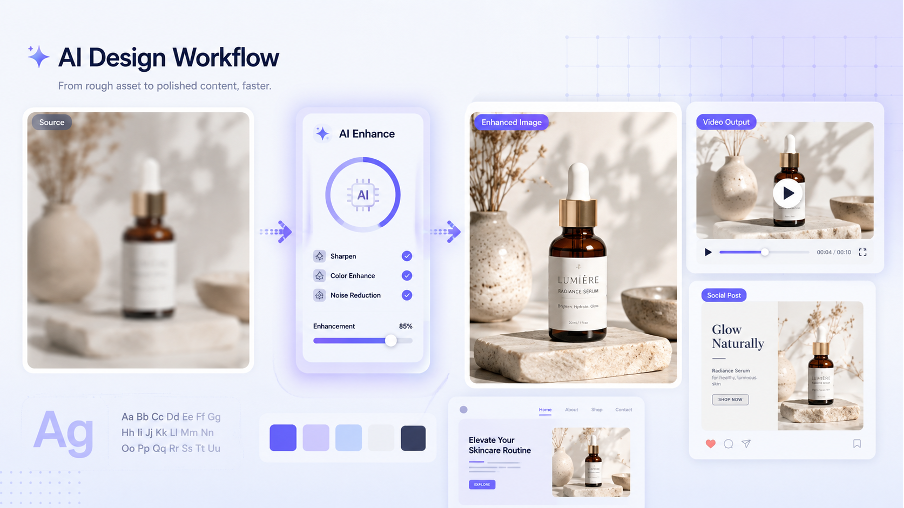
What Is an AI Video Enhancer?
Video has become a core part of digital design. Designers and creators now produce visual content not only for static layouts, but also for motion ads, product demos, social media reels, website backgrounds, and brand storytelling.
An AI video enhancer helps creators improve video clarity, reduce blur, upscale low-resolution footage, and make short-form videos, product clips, and promotional content look more polished.
This matters because video quality is often harder to fix manually than image quality. A low-resolution video may look acceptable on a small screen, but once it is used on a landing page, presentation, or large display, softness and compression become much more noticeable.
AI video enhancement gives designers and content teams a way to improve footage without needing advanced editing software or a full production workflow.
Why Video Quality Matters for Designers and Creators
Video is now part of brand identity. A company may use motion content on its homepage, in product launch campaigns, across social platforms, and in paid ads. If these videos look unclear or outdated, the brand experience becomes inconsistent.
AI video enhancement can help with:
- Improving video clarity
- Upscaling low-resolution footage
- Reducing blur in product clips
- Making social media videos look sharper
- Improving old promotional videos
- Preparing portfolio reels
- Creating better video thumbnails and previews
For designers, better video quality means greater flexibility. Existing footage can be reused in new campaigns, adapted for different channels, or included in presentation decks without looking out of place.
How AI Enhancement Supports Typography and Visual Branding
Fonts and typography shape the tone of a brand. A bold geometric typeface can feel modern and confident. A refined serif can feel elegant and editorial. But typography does not work in isolation. It needs to sit within a complete visual system that includes images, videos, colors, spacing, and layout.
AI photo and video enhancement help strengthen that system by improving the quality of the visual assets around the typography. When type, imagery, and motion all feel polished, the brand identity becomes more cohesive.
For example, a designer creating a landing page may choose a clean sans-serif font, a structured grid, and a minimal color palette. If the hero image is blurry, the page loses impact. Enhancing the image helps the typography and layout feel more intentional. The same applies to video backgrounds, campaign reels, and product clips.
Best Use Cases for Designers
AI enhancement tools are useful in many design scenarios.
A web designer can improve hero images, team photos, and case study visuals before adding them to a website. A social media designer can enhance images and video clips for posts, ads, and thumbnails. A brand designer can improve older assets so they fit better into a refreshed identity system.
Ecommerce designers can use enhanced photos and videos to create sharper product pages and promotional banners. Motion designers can improve source footage before adding text overlays, transitions, and branded elements.
These tools are not meant to replace creative direction. Instead, they help designers start with better source material, which makes the final layout stronger.
Final Thoughts
High-quality visual content is essential to modern design. Typography, layout, and color are important, but images and videos carry much of the emotional and commercial impact of a design.
AI photo enhancers help designers improve image clarity, fix blurry photos, and prepare stronger static assets. AI video enhancers help improve footage quality, upscale resolution, and make motion content look more professional.
For designers, creators, and small teams, these tools can save time and improve consistency. They make it easier to transform imperfect assets into polished visuals that support better websites, stronger brand presentations, and more engaging digital campaigns.