
How to Design Readable Captions for Short Rap Videos
A birthday rap clip can look lively on a laptop and become confusing on a phone. Two performers move across the frame, the background changes brightness, and the lyrics arrive faster than viewers can read them. Add oversized animated words and the captions may cover the faces that make the video personal. Designing readable captions for short rap videos means balancing words, performance and screen space, rather than simply choosing a bold font.
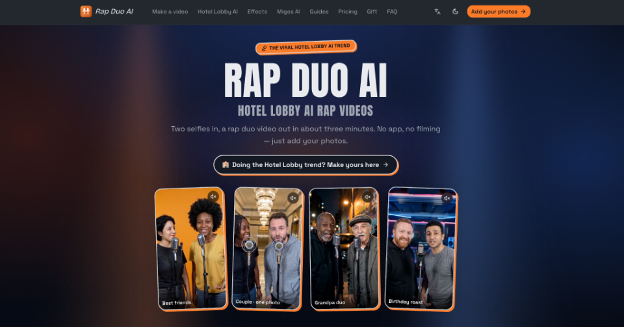
The practical challenge is deciding which words need attention and where they can sit without interrupting the action. Recording two people together may be impractical, while a ready-made template may leave little room for your message. For the performance itself, Rap Duo AI can generate a short rap video from two photos; Caption styling belongs in a separate editing stage. Plan that stage before choosing your typeface, so the finished clip remains understandable with sound off.
Decide What the Text Must Communicate
Start by separating three jobs: introducing the occasion, representing the spoken lyrics and identifying the people. A title such as “Maya’s birthday duet” supplies context. Captions communicate the actual performance. A name label identifies someone only when that distinction matters. Putting all three on screen throughout the clip creates unnecessary competition. Sketch when each element appears, and remove any label that repeats information already established.
For a hypothetical birthday video featuring two friends, use an opening title to establish the occasion, then let the lyrics take over. If the performers alternate lines, consider consistent caption placement rather than bouncing words between their faces. Different colours can support speaker identification, but names or labels should carry that meaning too. Check that a viewer can still distinguish the speakers when the colours are difficult to tell apart.
Decide whether you are making complete captions or selective lyric highlights. Highlights can emphasise a punchline, but they do not provide the same information as a transcript. If the clip needs full captions, preserve the words and adjust timing or layout instead of silently cutting difficult passages. Keep decorative headlines separate from the caption track so later revisions do not require rebuilding every text element.
Prepare the Performance Before Adding Type
Review the source footage before designing overlays. Watch once for meaning, once for visual continuity and once for usable text space. Note where a hand, microphone or face crosses your intended caption area. Choose the frame shape for the final destination before editing; a layout designed for a wide frame may lose both words and subjects when cropped vertically. Reserve typography for post-production, where spelling, placement and timing can be controlled.
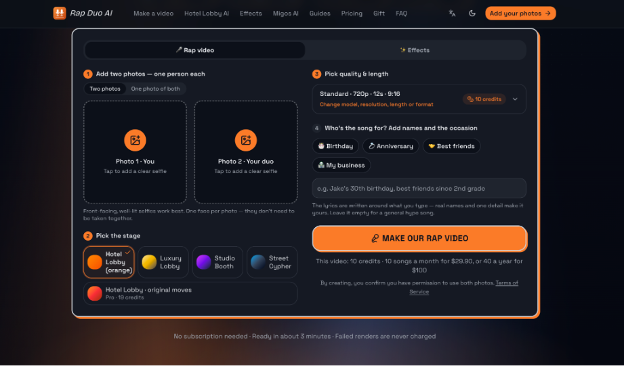
When two consenting participants cannot film together, the AI Rap Video Generator accepts one clear, front-facing photo per person, a stage choice and an optional topic, then creates a rap performance with generated lyrics, vocals and beat. Review the faces and pronunciation before downloading the MP4; if likeness is poor, replace an obscured or poorly lit photo. Add and style captions in a separate editor, checking them against what the generated vocals actually say.
Treat that clip as source material rather than an approved final edit. Do not use captions to disguise a distorted face, confusing performance or unwanted lyric. Replace unsuitable footage first. If you need an exact recorded verse or someone’s authentic delivery, filming may be more appropriate; The photo-based workflow creates its own song rather than accepting an uploaded audio track. Obtain agreement for both photo use and publication.
Build a Small, Consistent Type System
Choose Letters That Survive Movement
Test your actual words before selecting a font. Include the longest name, punctuation and any accented characters. Begin with a moderately heavy sans-serif whose lowercase letters remain distinguishable at phone size. Examine enclosed spaces in letters such as “a” and “e”: if those spaces disappear in the exported video, try another weight or family. A decorative display face can serve a short opening title without becoming the lyric font.
Keep the system restrained: one caption family, one title treatment and one optional emphasis colour. Check the font licence for your intended use rather than assuming that a downloadable font is unrestricted. Preview your longest caption in the chosen style before applying it throughout the timeline. If it only fits after shrinking substantially, revise the line break or divide it into successive phrases instead.
Stabilise Contrast and Placement
Moving backgrounds need testing across time. White letters may work over a dark jacket and disappear when a bright wall moves behind them. Try a dark caption panel or restrained outline, then scrub through the entire phrase. Judge contrast at the brightest and busiest moments, not just the opening frame. Avoid adding several shadows and strokes when one background treatment solves the problem.
Choose a caption region that avoids mouths and important gestures. Leave room for the destination app’s interface, then inspect a preview there because controls vary. Keep positioning steady within each shot unless movement makes that impossible. If two lines occupy too much space, shorten the displayed phrase through timing rather than squeezing the letters together. Faces should remain visible without forcing viewers to hunt for the words.
Time Phrases to Meaning, Not Every Beat
Use the audible performance to set caption boundaries. Split at a natural phrase ending, keeping names and closely connected words together. Start with short units and watch at normal speed without pausing. If you cannot finish reading before the next unit appears, redistribute the words across a longer interval or reconsider the clip. Do not correct a timing problem by making each word flash more dramatically.
For a fast birthday punchline, keep the setup readable before revealing the final phrase. Test whether the ending arrives with the vocal delivery rather than after the joke has passed. Use emphasis sparingly: one changed weight or colour is usually easier to follow than simultaneous bouncing, scaling and rotation. Leave complete captions intact beneath any optional decorative lyric treatment.
Approve Export on a Phone
Make readability the final approval condition. Watch the exported file on a phone at normal size, first muted and then with audio. Confirm that the occasion is understandable, every caption matches the vocals, faces remain visible and no interface covers essential words. Check names and line breaks separately; familiarity can make spelling mistakes surprisingly easy to overlook.
When a check fails, change one variable at a time: timing, line length, placement or contrast. Save the approved styling as a reusable starting point, not a substitute for reviewing the next clip. Different faces, backgrounds and verses will still need their own checks.