
How Fine Pitch LED Display Pixel Pitch Affects Image Clarity
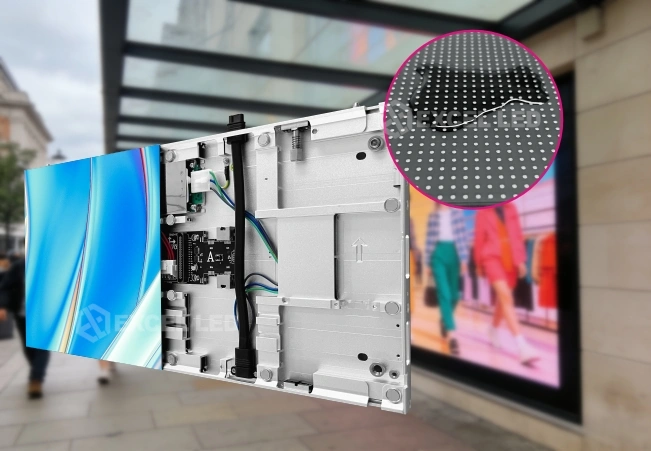
The clarity of an image is a key factor in the effectiveness of an LED display in communicating information, visuals, and maintaining detail. Whether it’s a control room or a corporate presentation, screens need to provide crisp text, the right colors, and smooth images at various viewing distances. These properties are directly connected with the distance between adjacent LED pixels (pixel pitch). This knowledge will help you select a display that will satisfy your resolution requirements, space, and viewing conditions. The appropriate pixel pitch guarantees that the image will not get fuzzy and provides a bigger screen and lower system cost without compromising image quality.
- Understanding Pixel Pitch and Pixel Density
Pixel pitch: The distance (in millimetres) between the centre of two adjacent pixels. For example, a P1.25 display has a gap of 1.25mm between each pixel, while a P1.86 display has a bigger gap between the pixels.
The lower the pixel pitch, the more it allows the manufacturer to pack into the same screen space. This translates to more pixels per inch, which means that your screen will display more details, smaller text, and smoother edges.
Typically, fine-pitch LED displays will be P2.0 or smaller. They have a high pixel density and can be used when the audience is in proximity to the screen.
- How Smaller Pixel Pitch Improves Image Clarity
A smaller pixel pitch will minimize the ability to see the gaps between each pixel, making images more seamless. That’s particularly important when displaying intricate graphics, fine lines, complex charts, and high-resolution video material.
If the viewer is close to a large screen, larger pixel spacing may result in the individual pixels being visible. This may lead to a grainy effect, especially in the areas of text and diagonal lines. The smaller the spacing, the less this effect will be noticeable, and the sharper it will look.
But the pixel pitch is not the only factor to consider when it comes to image quality. The resolution of the source, processing power, and brightness, contrast, and colour calibration also have a significant influence on the result. A low-resolution source cannot provide detail that can be recovered by the dense LED screen.
- Viewing Distance and Fine-Pitch Display Performance
The distance at which viewers are able to distinguish individual pixels is dependent on the viewers’ distance. The closer one is to a screen, the cleaner and more detailed the image will be, and the smaller the pixel pitch. The visual perception between the adjacent pitch choices becomes less noticeable further away.
For example, P0.9 and P1.25 displays may be suitable for close viewing, while P1.56 and P1.86 displays may be appropriate for a more distant viewing. Actual suitability is dependent on the size of the screen, the content, viewing conditions, and resolution requirements.
There are 3 main factors to consider when selecting the LED Screen: Fine Pitch LED Display Price, Distance for Viewing, and Image Detail. The smaller the pitch, the more expensive it will be because it will require more pixels and precise manufacturing. A higher density than is required may cost more for the project and may not be more effective at viewing distance.
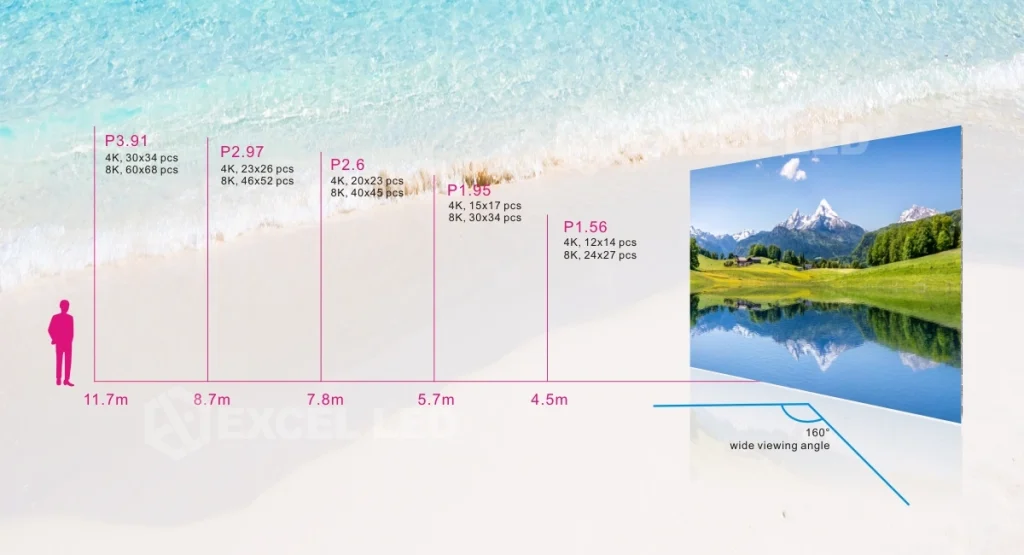
- Pixel Pitch Options and Their Practical Differences
There are varying combinations of viewing distance, resolution, and installation requirements for different pixel pitches. This will enable you to determine which specification to use for a given project for an indoor display.
Common Fine-Pitch Options
- P0.9: Supports highly detailed visuals for close-viewing environments and demanding monitoring applications.
- P1.25: Offers dense pixel placement for conference rooms, presentation spaces, and control centers.
- P1.56: Balances image detail and system cost for many indoor fixed-display installations.
- P1.86: Provides a practical option for larger viewing distances and applications with less demanding close-up detail.
These examples illustrate general differences rather than strict application limits. The appropriate choice depends on the complete display configuration, including cabinet dimensions, native resolution, and viewing distance.
- Resolution and Screen Size Work Together
The pixel density is determined by the pixel pitch, and the physical screen size determines how many pixels are there across the screen. The smaller the pitch, the higher the native resolution for the same physical size.
For instance, if both are the same size, a P1.25 screen will have a higher pixel density than a P1.86 screen. This can help to enhance the reproduction of fine text, intricate diagrams, and detailed video footage.
When creating 4K content, screen size also needs to be taken into consideration. The resolution of a source should be equal to or less than the resolution of a display. Otherwise, it may be scaled when processing, and may cause the loss of details. The arrangement and aspect ratio of cabinets should therefore be in line with the planned content and installation space.
- LED Packaging Technology and Surface Quality
The pixel pitch means the distance between pixels, and the packaging technology relates to the durability and physical characteristics of the display surface. The protection technologies are different for these three types of LED technologies: surface-mount device (SMD), glue-on-board (GOB), and chip-on-board (COB).
SMD is still widely used in many indoor display situations and enables individual parts to be serviced. GOB coats the LED surface with a protective layer, enhancing dustproof, moistureproof, and accidental contact resistance. COB mounts the LED chips directly on the board and offers a compact and protected surface that is suitable for the ultra-fine pitches.
With appropriate optical and display-system design, COB can also help to achieve deep blacks and high contrast. But the clarity is not only dependent on the packaging technology but also on the quality of the components, their calibration, processing, and operating conditions.
- Calibration, Processing, and Long-Term Image Consistency
Even if you have a high-end display, you can still obtain a poor image if the components don’t have the same brightness and colour performance. Calibration is used to make individual modules produce the same colours and luminous intensity, which minimizes the visible differences between modules.
The high-quality driver ICs, proper control systems, and safe signal transmission also guarantee stable image reproduction. These components are used to control the transition of gray levels, refresh, and synchronization of large arrays of pixels.
The reason why precision is important in manufacturing is that even a small inaccuracy can be observed in a small-pitch screen. EXCEL LED is a Chinese in-house production display project solution supplier and a customized LED screen display project supplier for different applications. The engineering and installation instructions can help to solve configuration, handling, and system-integration needs.
- Choosing Pixel Pitch for Clear, Reliable Visuals
Choosing the right pixel pitch involves considering factors like image clarity, viewing distances, screen size, and cost. First, find the smallest print or picture the display needs to be able to read, and then make an educated guess as to how far viewers might be from the display. Then, determine the native resolution required and determine if the screen size is appropriate for the content.
Also take into account environmental factors and maintenance needs. Protective packaging may be a critical factor in high-traffic areas, and continuous performance over extended use could be a critical factor in control rooms. Signal processors, cabinet alignment, and calibration should also be taken care of during system planning.
For various project needs, EXCEL LED provides indoor, COB, rental, and other display options. These specifications can be compared to help determine whether or not a particular pixel pitch will provide any useful visual improvement for a given installation.
Conclusion
The LED display’s pixel pitch is a critical factor that affects the clarity of the display, the density of the pixels, and the visibility of each pixel. The smaller the distance, the more close-up the details, the more the sharpness and continuity of images, and the larger the distance for installation from a distance.
However, it’s not all about the pixel pitch, since that is just part of what makes it the best. Resolution, screen size, packaging technology, calibration & signal processing all have an impact on the final image. With all these factors taken into account together, project planners will be able to select an LED display that will deliver the desired clarity, performance, and intelligent long-term value.