
How to Create Engaging Product Demo Videos with MagicLight AI

When selling website templates, digital products, or online services, a well-designed product page is important. To help customers understand how a product looks, works, and solves their problems before making a purchase, product demo videos are a pretty good option. With AI-powered video creation tools, producing these videos no longer requires professional filming equipment or advanced editing skills. MagicLight AI is one platform that simplifies this process by combining AI script generation, character creation, storyboard development, and video production. In this guide, we will explore how to use MagicLight AI to create engaging product demo videos from scratch.
Part 1. What Is MagicLight AI?
1.1 Introduction to MagicLight AI
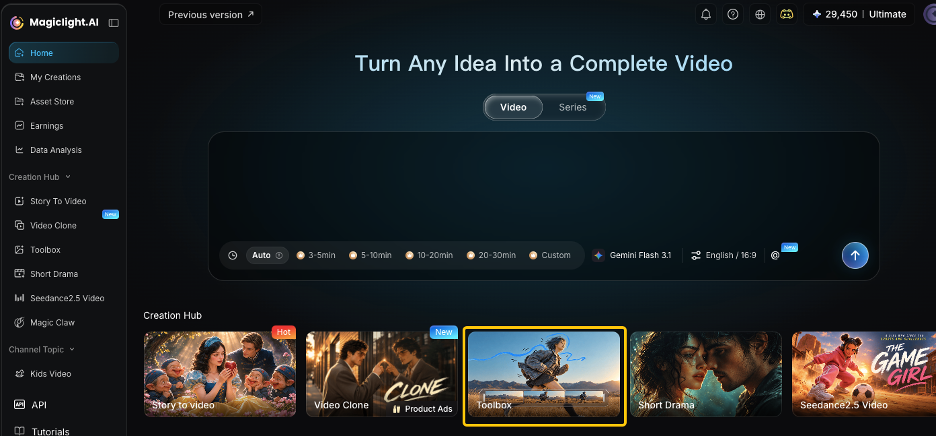
MagicLight AI is an AI-powered video creation platform that transforms written ideas and scripts into complete videos. It combines storytelling, visual generation, and audio customization in one workflow, helping creators produce content without manually handling every stage of video production. It also offers AI image generation, which can generate product photos as requested.
For digital product sellers, the platform offers a way to turn product descriptions and feature explanations into structured video presentations. For example, a website template seller could create a video introducing a new WordPress theme, highlighting its homepage layout, customization options, and responsive design.Beyond as a product demo video maker, MagicLight AI can also support promotional videos, educational content, tutorials, and longer storytelling projects.
1.2 Key Features of MagicLight AI
MagicLight AI makes the process simpler by bringing the entire video production workflow into one platform. From turning product descriptions into scripts to generating scenes, creating AI presenters, and adding voiceovers and subtitles, you can create engaging product demo videos with just a few steps.
- Create Complete Product Demo Videos, Not Just Short Clips
MagicLight supports long-form video generation of up to approximately 50 minutes, giving you the flexibility to create detailed product demonstrations, feature walkthroughs, tutorials, and promotional videos. Instead of combining multiple short clips manually, you can build a more complete video that introduces your product, explains its key features, and demonstrates its value. - An All-in-One Workflow from Product Idea to Finished Video
MagicLight brings script generation, storyboarding, AI character creation, visual style selection, and video production together in one platform. Simply start with a product idea or description, develop your script, and let the AI help organize scenes and generate video content. You don’t need to switch between multiple tools or manage every production step manually. - Create Consistent AI Presenters and Visuals
A recognizable presenter and consistent visual style can make product demo videos feel more professional. MagicLight helps maintain character consistency across multiple scenes, making it easier to create a continuous presentation with a stable visual identity. You can also customize characters and visual styles to better match your product and brand. - AI-Powered Storytelling Makes Video Creation Easier for Beginners
Not sure how to structure a product demo video? MagicLight’s built-in AI storytelling capabilities can help turn simple product ideas into organized scripts, narrative structures, and scene arrangements. Rather than planning every shot or editing everything from scratch, beginners can follow an AI-assisted workflow to create a complete product presentation with less manual effort.
With MagicLight AI, you don’t need professional video editing experience to get started. It combines Story Creation + Video Production + Character Consistency + Long-Form Content Creation in one easy-to-use workflow, helping beginners and experienced creators turn product ideas into polished, engaging product demo videos more efficiently.
Part 2. What Should You Prepare Before Creating Product Demo Videos with MagicLight AI?
Before generating a video, it is worth spending time organizing your product information and planning the presentation. Good preparation can make the final video more focused and effective.
2.1 Define Your Product and Target Audience
Start by identifying what you want to demonstrate. It could be a WordPress theme, website template, UI kit, website builder, or another digital product.
Next, consider your target audience. Are you creating a video for web designers, small business owners, developers, or people building their first website?
Understanding your audience helps determine the tone and level of detail. For example, a video introducing a beginner-friendly website template should emphasize ease of customization and ready-made layouts, while a presentation for developers may focus more on technical flexibility and available components.
You should also define the video’s main purpose, whether it is to introduce a product, demonstrate specific features, explain how to use it, or encourage visitors to explore a purchase.
2.2 Identify Key Product Features
Avoid trying to explain every product detail in one video. Instead, select three to five features that provide the most value to potential customers.
For a website theme, these might include:
- Responsive layouts for desktop and mobile devices.
- Customizable colors, typography, and page sections.
- Pre-designed homepage and inner-page templates.
- Built-in navigation and content components.
- Compatibility with relevant website-building tools.
Prepare screenshots, design previews, and concise feature descriptions. These materials will help you create more accurate scripts and visual scenes.
2.3 Prepare a Video Script
A clear script gives your product demo a logical structure. A simple format includes three sections:
- Introduction: Present the product and explain what it offers.
- Main Demonstration: Highlight important features and explain their benefits.
- Conclusion: Summarize the product’s value and include a call to action.
For example, a video about a business website template could begin by introducing its modern design, demonstrate its homepage and customization options, and finish by inviting viewers to explore the template.
You can also use MagicLight AI’s script generation capabilities to help organize product descriptions into a structured narrative.
2.4 Plan the Visual Style and Video Structure
Decide how the product should be presented visually. A professional and minimalist style may work well for business templates, while colorful 3D animation could be more suitable for creative products.
Plan the scenes according to your script. Consider where to introduce the product, when to highlight individual features, and which visual elements will help explain each point.
If you want to include an AI presenter, prepare a character description and decide what role the presenter will play.
Part 3. How to Generate Product Demo Videos with MagicLight AI
Once your product information and script are ready, you can begin creating the video.
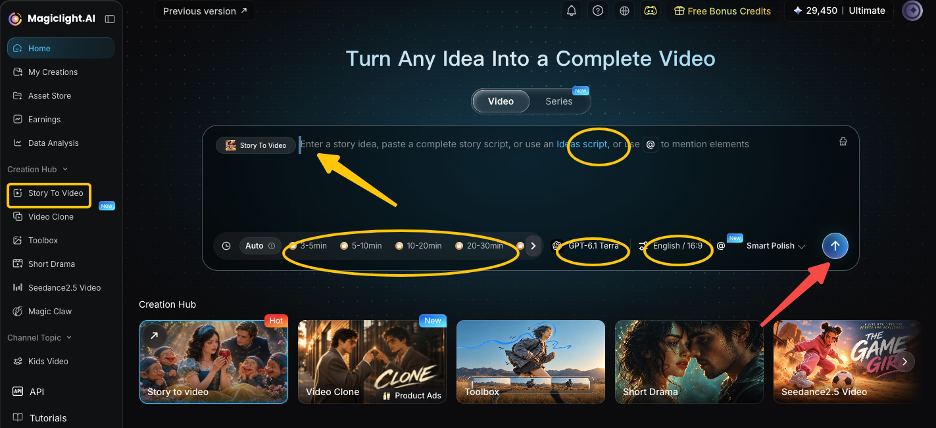
Step 1. Open MagicLight AI and Start a New Project
Visit MagicLight AI and enter the Story-to-Video workflow. Input your script or ideas, and select the appropriate aspect ratio, length of video, story model,language and ratio. Click the upper arrow for the next step.
Step 2. Generate or Rewrite Your Product Demo Script
Use AI assistance to develop the narrative and generate your product demo script. You can also modify AI generated script or input your ready script.
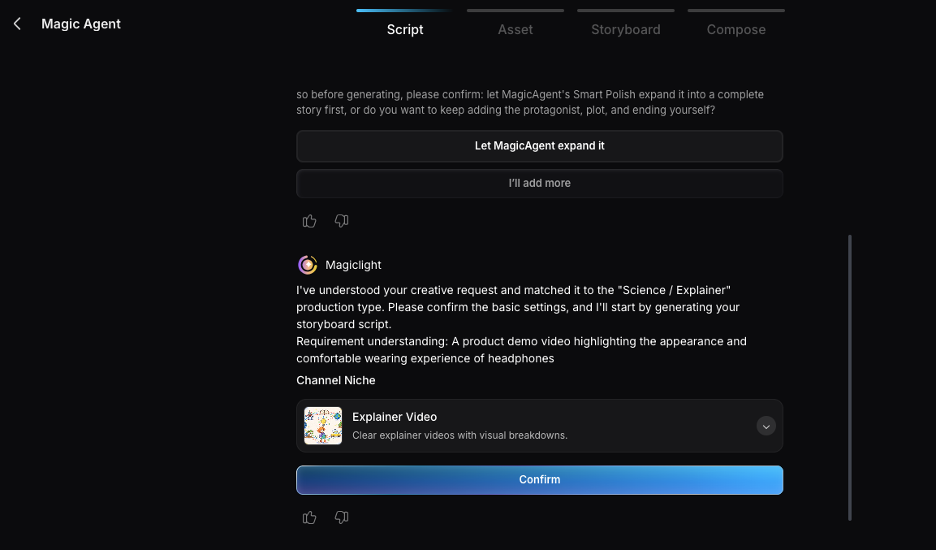
Organize the content into an introduction, key product features, demonstrations, and a closing message in the script. Review the generated script to make sure the information is accurate and easy to understand.
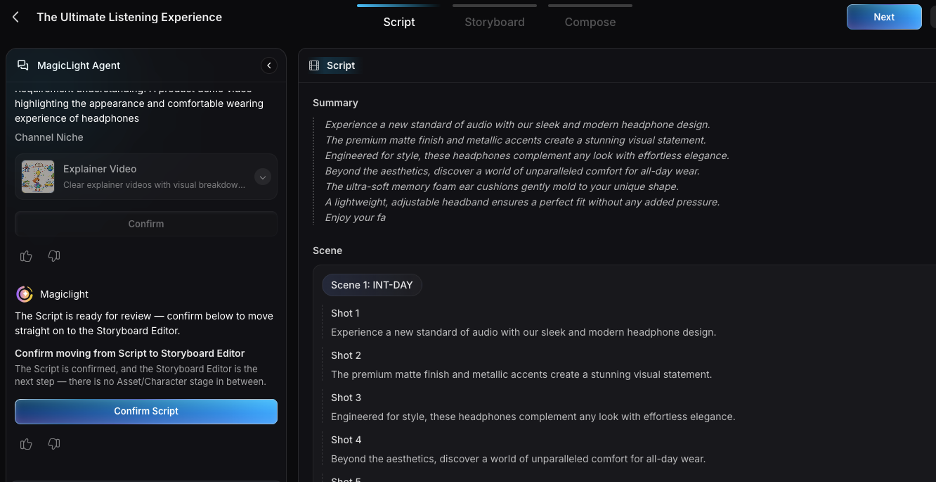
Step 3. Create AI Characters and Select Visual Styles
If your product demo would benefit from a presenter, create or select an AI character. Then choose a visual style that complements your product and brand identity.
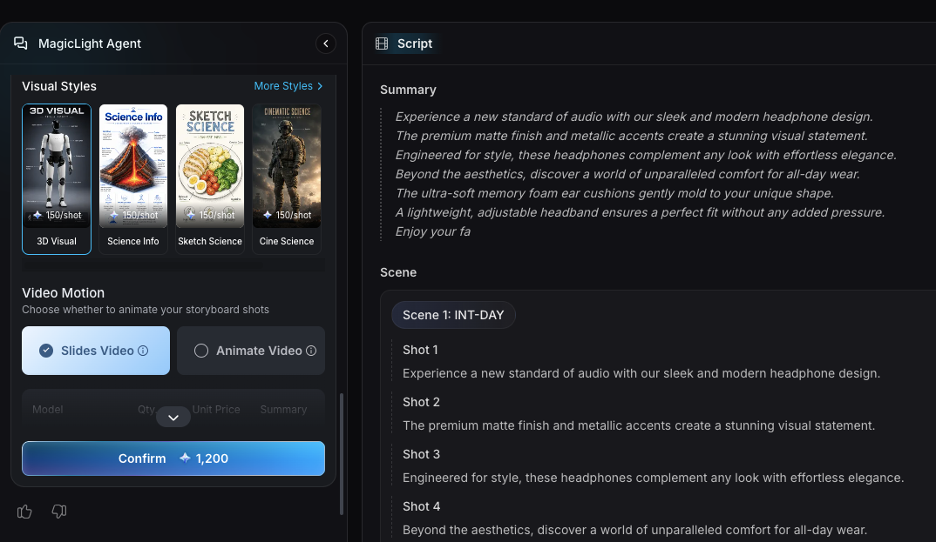
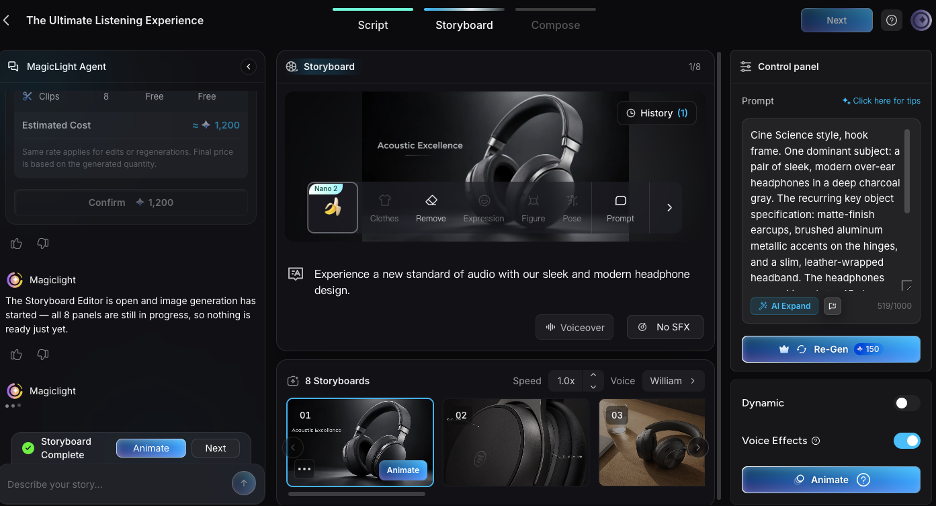
Step 4. Generate and Refine the Storyboard
MagicLight AI can automatically organize the script into individual scenes and generate a storyboard for preview.Review the scenes to check whether they match the intended message. You can edit scene prompts and regenerate visuals when necessary. Nano tools can also help refine visual details such as character poses, expressions, clothing, and body types.
For product demonstrations, make sure each scene clearly supports the feature being explained.
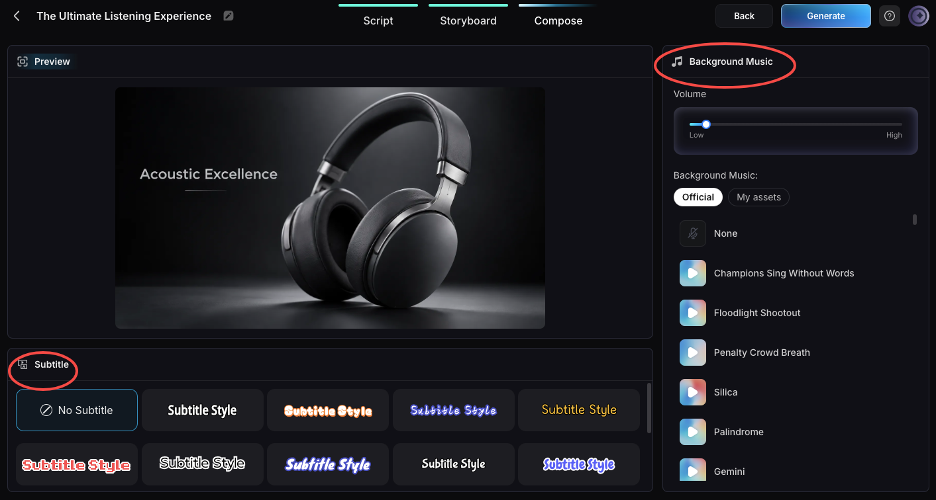
Step 5. Add Voiceovers, Subtitles, and Background Music
Select an AI voice or use voice cloning to add narration. Choose a voice that fits your brand and target audience.
Add subtitles to emphasize important product information and improve accessibility. You can also select background music that supports the presentation without distracting viewers from the main content.
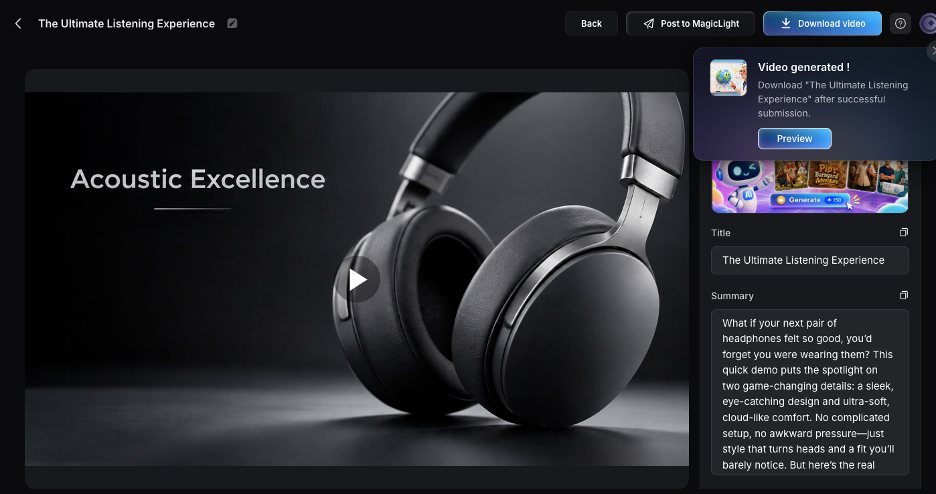
Step 6. Export and Publish Your Product Demo Video
When the video is ready, select the desired aspect ratio and output resolution from the available settings. Choose or generate a suitable cover, then review the complete video before exporting.
Finally, publish the video on your product page, template marketplace, landing page, or social media channels. Placing a product demo near the main product description or preview section can help visitors understand what they are considering.
Part 4. Tips for Creating More Effective Product Demo Videos
4.1 Keep the Introduction Short and Clear
Capture viewers’ attention early by introducing the product and its main value within the opening seconds. Avoid lengthy explanations before showing what the product offers.
4.2 Focus on Benefits, Not Just Features
Instead of simply listing product functions, explain how they help customers. For example, rather than saying a theme includes responsive layouts, demonstrate how the design adapts to different screen sizes.
4.3 Use Consistent Branding and Visual Styles
Maintain consistent colors, typography, visual styles, and presentation elements throughout the video. This helps create a recognizable brand experience.
4.4 Include a Clear Call to Action
Finish with a specific next step, such as exploring the template, viewing a live demo, or visiting the product page. A clear call to action helps connect video engagement with your business goals.
Conclusion
Product demo videos provide an effective way to showcase website templates, digital products, and online services. By combining clear scripts, informative scenes, and engaging visuals, businesses can communicate product value more effectively. MagicLight AI simplifies the production process with AI script generation, character creation, storyboard development, video generation, voiceovers, and subtitle customization in one workflow. Whether you are introducing a new website theme or explaining a digital product’s features, it offers a practical way to turn product information into engaging video content.