
Light Diffusion Techniques Using Printed Materials for Striking Image Showcases
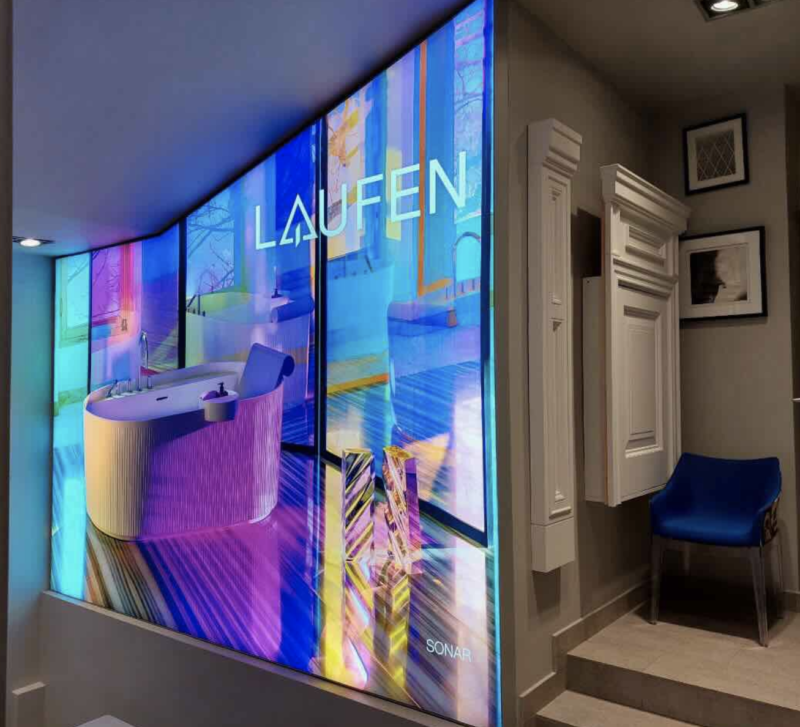
Strong sunlight may make a flat print look flat. However, the same image, combined with the appropriate diffusion technique, can be alive, gentle colors, even light, not glare. I have tried this in studio setups and trade show paneling and the difference is evident within seconds. When it comes to light control, it does not merely concern the lamps, but rather the material, the print and the interaction of the two. When your screens look distorted or dull, it is likely that the problem lies in the surface. We can deconstruct the way printed materials influence light and how you can take advantage of that.
Core Principles of Light Spread Through Printed Surfaces
Printed surfaces do not allow light to go through in a straight line. It scatters. That scatter determines the smoothness or roughness of the resulting image. Three things occur when light strikes a printed fabric or film:
- Transmission: a portion of the light is transmitted.
- Absorption: there is some light in ink and material.
- Diffusion: light is scattered in a multitude of directions.
A denser fabric diffuses light more and brightness decreases. Thin film is more permeable to light, but can be hotspotted. Personal tests suggest that polyester cloth at medium thickness is usually the best balance of about 60 70 percent transmission of light evenly spread. Texture matters too. A smooth surface is better avoided because it does not break up light as well as a fine weave does to prevent sharp glare.
Types of Printed Materials Used for Light Diffusion
Choosing the right material is the base of any good display. Each option behaves in a clear and predictable way when light passes through it.
Fabric-based materials are the most widely used. In seg fabric printing, stretch polyester is printed with dye-sublimation ink. This method allows deep color and smooth light spread. These fabrics sit tight in frames, which removes wrinkles that could distort light.
Other common options include:
- Backlit film: It allows strong brightness and sharp detail, but light spread is limited. This can lead to visible bright spots if the light source is too close.
- Frosted vinyl: It softens light well and reduces glare. It works best on glass or flat panels where full brightness is not required.
- Acrylic panels with printed layers: These provide a clean, solid look. Light spreads in a controlled way, and the surface stays stable over time.
From experience, SEG fabric systems work best for large displays. They give even light spread, stable tension, and consistent visual output across the full surface.
Print Design Choices That Affect Light Diffusion
Even the best material will fail if the print file is not prepared for light. I’ve seen strong images lose detail simply because ink levels were too high. When light passes through dense ink, it gets blocked, which creates dark patches.
Here are key design factors that shape the final result:
Ink Density Control
Lower ink levels allow more light through. For backlit prints, reduce total ink coverage by about 10–20% compared to standard prints. This keeps brightness balanced and avoids dull areas.
Gradient Use
Hard transitions in color can create visible bands under light. Smooth gradients help the light spread evenly across the surface. This is very important for skies, backgrounds, and soft tones.
Contrast Adjustment
Images for backlit use need stronger contrast. Light softens edges, so boosting contrast before print helps retain detail. Without this step, images may look flat once installed.
Color Profiles
Use profiles made for illuminated output. Standard RGB to CMYK conversion often leads to weak tones when light is added behind the print. A proper profile keeps colors closer to the original image.
Test Prints
Never skip this step. A small sample under the actual light source can reveal issues fast:
- Uneven brightness
- Color shifts
- Loss of shadow detail
From my own workflow, I always test a small sample before full production. It saves both time and cost, and it ensures the final display looks exactly as planned.
Light Source Placement and Control
The light behind the print is crucial even on the best print. I have done some displays where a slight movement of a few centimeters corrected uneven brightness. The distance of light, its type, and direction are important.
Start with spacing. Even spread is generally provided by a distance of 8-15 cm between the print surface and the source of light. Hot spots can be the result of less distance. The farther the light, the dimmer.
- Then select the appropriate light:
- LED panels: uniform performance, suitable to big screens.
- LED strips: can be bendable, however, should be spaced.
- Color temperature: 5000K-6500K is optimal when it comes to neutral tones.
When working with custom seg frames, built-in LED systems often provide pre-set spacing and alignment. This reduces setup errors and helps maintain consistent light across the entire image.
Frame Systems and Mounting Methods
A stable frame keeps the printed material flat, which is key for clean light diffusion. Even small wrinkles can break the light pattern and distract the viewer.
SEG systems are widely used because they hold fabric under tension. The silicone edge fits into the frame groove, which keeps the surface smooth and tight. This is why they are common in retail and gallery displays.
There are several mounting options:
- Wall-mounted frames for fixed displays
- Free-standing units for events and shows
- Double-sided frames for viewing from both sides
Ventilation is also important. LED lights produce heat, and airflow inside the frame helps maintain stable performance over time.
Common Problems and Practical Fixes
Despite proper planning, problems may emerge. It is best to identify them at the initial stages and implement easy fixes.
The most prevalent is uneven brightness. It is frequently caused by spacing of lights. Move the distance between the light and the print further or replace the LED panel with a larger one.
Hot spots are observed when the sources of light are either too near or too bright. Turn on diffusers or dimmer.
When the light overwhelms the print, it results in color washout. Reduce the intensity of the light or change the print file to a higher contrast.