
Redirecting the Visual Style of a Video the Way You Already Redirect a Static Design
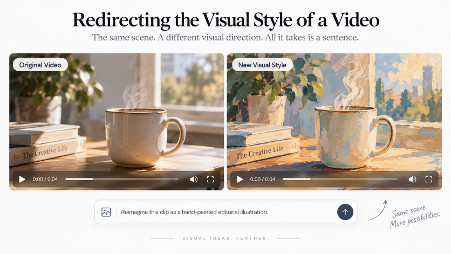
Designers change visual direction all the time.
A client sees a product image and asks for a warmer palette. A campaign that felt too polished needs more texture. A photographic treatment needs to become more illustrative. The content can stay recognizable while the visual language changes around it.
That ability to redirect a look is part of everyday design work. It depends less on knowing a particular software panel than on knowing how to describe a visual intention clearly.
The same skill is becoming useful in video.
Instead of rebuilding a clip from scratch, a designer can increasingly take an existing video and ask for a different visual treatment: painterly, textured, cinematic, graphic, muted, or more editorial. The medium changes, but the design judgment behind the request is familiar.
What Style Redirection Means in Video
In static design, a style change usually means altering the treatment without changing the basic message.
The same principle can apply to moving footage.
Imagine a short product clip on a tabletop. The original version is photorealistic and evenly lit. A second version might keep the same general scene and movement while shifting toward a hand-painted illustration. Another might push the image toward grainier, softer, more nostalgic visual language.
The goal is not to create a new concept every time. It is to explore how the same scene reads under a different aesthetic direction.
That makes style redirection useful for designers who are still deciding how a campaign should feel before they commit to a final visual system.
Why This Is a Design Decision Before It Is a Technical One
Traditional video tools often expose style through technical controls: curves, color balance, contrast, grain, masks, overlays, and compositing.
Those controls are powerful, but the creative brief usually arrives in different language.
“Make it warmer.”
“Make it feel more editorial.”
“Give it a printed texture.”
“Make it feel less glossy and more handmade.”
These are design directions, not parameter values.
Text-based video editing lets the creator begin closer to that language. Instead of translating every visual intention into a long list of settings first, the designer can describe the look, review the result, and refine the direction.
The important skill is still visual judgment: knowing what “warmer,” “rougher,” “cleaner,” or “more graphic” actually means for the project in front of you.
Applying a New Style Without Rebuilding the Scene
Some current AI video systems support restyling an existing clip while attempting to preserve the underlying motion and scene structure.
Gemini Omni, for example, supports applying new visual styles to input video and then refining the result through natural-language conversation.
That makes it possible to take one moving scene and explore multiple visual directions without rewriting the entire concept from the beginning.
A designer might start with a realistic clip, test a watercolor treatment, then move toward a flatter editorial illustration style. If the first pass feels too saturated or too textured, the next instruction can narrow the result.
The system is still generative, so details can drift and every version needs review. But the workflow is useful because the visual direction can evolve without forcing the creator to abandon the underlying scene each time.
Global Style Changes Are Easier to Define
Some style requests are easier to communicate than others.
A global direction such as “make the entire clip look like a hand-painted illustration” has a clear scope. So does “use a softer, grainier, vintage photographic treatment.”
These requests affect the whole visual language of the clip.
Localized style mixtures are more complicated. A request such as “keep the product photorealistic but make only the background watercolor” asks the system to maintain two different rendering rules within the same moving frame.
That can still be worth testing, but it demands closer review because the visual boundary between the two treatments has to remain coherent over time.
The same is true for any restyle that changes the look dramatically while the scene continues to move.
Typography and Fine Detail Need Extra Attention
Typography deserves special care.
If a video contains important type, logos, labels, or interface text, a broad style transformation can affect those details in ways that are difficult to predict.
For a campaign that depends on exact letterforms, spacing, brand typography, or legal text, it is often safer to add those elements after the visual restyle in a traditional compositing or editing tool.
Fine product details deserve the same attention.
A style pass may simplify texture, soften edges, or reinterpret small shapes. That can be acceptable in an exploratory creative test, but it may be inappropriate when the final asset needs to represent a product or brand element precisely.
Restyling is most useful when the purpose is visual direction, not factual precision.
Use Restyled Video as a Moving Mood Board
For designers, one of the strongest uses is mood exploration.
Static mood boards already work this way. You collect references, test palettes, compare textures, and decide whether the campaign should feel polished, playful, nostalgic, restrained, tactile, or cinematic.
Video adds motion to that same decision.
A short source clip can become several moving style studies. One version might feel clean and modern. Another might feel textured and handmade. A third might lean into a more graphic, poster-like treatment.
These clips do not have to be final deliverables.
They can function as moving references that help a team decide which direction deserves further production work.
The Visual Vocabulary Is Already Familiar
Designers already know how to redirect a visual language.
They know that “warmer” is not simply “more orange.” They know that “editorial” can refer to restraint, contrast, composition, typography, or texture depending on context. They know that “vintage” can mean many different things unless the brief becomes more specific.
That vocabulary now matters in motion as well.
The better the direction, the easier it is to judge the result.
A vague request produces a vague target. A clear description of palette, texture, lighting, rendering style, and overall mood gives the designer something concrete to compare against.
The technology may be new, but the underlying skill is not.
It is still the designer’s job to decide what the work should feel like — and to recognize when the result has actually arrived there.