
How to download fonts safely for Word, Mac, and design apps
Balancing client delivery dates with the hunt for a distinct heading style is stressful enough without having to worry about hidden trojans or accidental copyright infringement on a commercial campaign. When you know how to download fonts from trusted type foundries and curated libraries, you can confidently install stable, cross-platform assets tailored to your exact licensing needs.
How to download fonts safely: key insights
- The safest places for learning how to download fonts are official foundries, Google Fonts, and established catalogues that publish license terms next to each download.
- A legitimate font file ends in .ttf or .otf; if a download arrives as .exe or .msi, it’s definitely not a font and should be deleted.
- A free download doesn’t equal a commercial license: OFL fonts allow business use, while personal-use fonts don’t cover client work or ads.
- A font installed at the system level works in Word and desktop design apps, while Canva needs a separate upload to its Brand Kit.
Where to download font files without security risks
The safest sources are official font foundries, established directories, and services that publish licensing information alongside their downloads.
- Google Fonts offers open-source typefaces with accessible license information and convenient family previews.
- FontsArena provides a searchable catalogue of popular typefaces, including Helvetica, Garamond, Poppins, and Futura.
- Official foundries are preferable when purchasing premium fonts or obtaining complete commercial font families.
- Adobe Fonts provides licensed typefaces through Creative Cloud for compatible desktop applications.
Unfamiliar websites require additional caution. Fake Download buttons can redirect visitors to advertising pages, phishing websites, or malicious installers. A legitimate font file normally uses extensions such as .ttf or .otf, rather than .exe or .msi.
A downloaded zip archive should contain recognizable font files and licensing documents. An antivirus scan adds another security check, although it cannot guarantee that every malicious file will be detected. The FBI recommends downloading files only from trusted sources and avoiding suspicious links.
How to protect your connection when downloading fonts
Downloading files from third-party websites over public Wi-Fi introduces additional privacy risks. HTTPS, updated security software, and careful source verification should remain the primary precautions.
A proxy can provide an additional privacy layer by routing network requests through another IP address. For users comparing affordable options, cheapest proxies from Youproxy is one example of a service mentioned in discussions about connection privacy. Youproxy provides proxy services, but a proxy doesn’t independently scan downloads, guarantee encryption, or replace antivirus protection.
How to check font licenses before using downloaded typefaces
A free download doesn’t automatically grant permission for every project. Each font license defines how a typeface can be installed, modified, distributed, embedded, or used commercially.
Three common licensing situations deserve attention:
- SIL Open Font License (OFL 1.1): Permits commercial use, modification, and redistribution under specified conditions. Modified fonts may need different names when reserved font names apply.
- Personal use: Allows private projects but generally excludes business advertising, paid client work, and other commercial applications.
- Commercial use: Permits business-related applications within the specific rights granted by the license. Additional restrictions may still apply.
The SIL OFL has been available since 2007, and its current version is 1.1. Its official documentation explains the conditions for distributing and modifying fonts.
You can also check FontsArena’s comprehensible explanations of OFL, Apache, MIT, and Creative Commons licenses. However, the original license included with each download should always take priority over a directory’s simplified description.
How to download fonts to Windows and Mac computers
Most desktop systems support common OTF and TTF formats. However, installation procedures differ between operating systems.
Windows installation:
- Download the required font from a trustworthy source.
- Extract the archive if the download arrives as a ZIP file.
- Locate the .ttf or .otf file and double-click it.
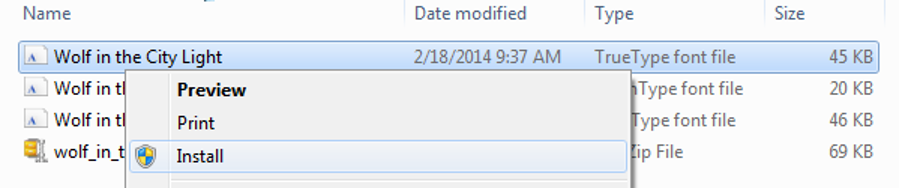
- Review the preview and select Install.
- Alternatively, right-click the file and choose Install or Install for all users.
Windows 10 and 11 also provide font management through Settings, under Personalization and Fonts. The control panel offers another way to inspect installed typefaces.
Mac installation:
- Download the font and extract its archive if necessary.
- Double-click the font file in Finder.
- Preview the typeface and select Install.
- Open Font Book to inspect the installed family.
- Use File and Validate Selection to check for errors.
macOS supports TrueType, OpenType, and several other collection and variable formats. Newly installed fonts go through automatic checks for errors and duplicates.
How to download fonts to Word, Canva, and Photoshop
Some users may wonder how to download fonts for specific desktop applications. The thing is, while there are apps that come with their own typeface libraries, generally a font is a system-wide addition. You install it once, and every compatible app on the device can use it. Sometimes, however, you need to restart a program like Word to get it to recognize the update to the list of available options.
Canva as a fully cloud-based service handles custom fonts differently. It has a Brand Kit feature that supports three formats: OTF, TTF, and WOFF. The number of typeface files you can add with this feature depends on your subscription plan. You can only select ones whose licenses permit embedding.
With Photoshop, you can easily use local fonts, adding them through Font Book on macOS or with Windows’s native functionality. But you also get the option to use Adobe Fonts. It works great if you want the same resources to be available across multiple devices with the same subscription. Here’s how:
- Open the Creative Cloud app on your desktop.
- Go to the Fonts section and browse available families.
- Click on Add Family or choose an individual style.
- Wait until Creative Cloud shows the family as active.
- Open Photoshop or Adobe Illustrator and enjoy using the new typeface with it.
Rule of thumb: install fonts at the operating-system level for Microsoft Office and standalone design software, but use the dedicated upload or activation process when working with cloud-based services.
Frequently asked questions about downloading and installing fonts
The answers below address common questions on how to download fonts with an eye for compatibility, installation, licensing, and troubleshooting.
Which font format should be chosen: OTF or TTF?
Modern operating systems and design applications widely support both TrueType (TTF) and OpenType (OTF) formats. The former is the typical choice for everyday documents and desktop use, whereas the latter can come with advanced typographic features such as alternative characters and ligatures. Your choice should depend on the app you’re going to be using the font in. Check which formats it accepts via settings or the description on the developer’s website.
Why does a newly installed font not appear in Word?
Microsoft Word doesn’t maintain a font library of its own. Instead, it uses the typefaces installed in the operating system. If you added a new one with Word running actively, you might need to close and reopen it to refresh the font list. Also check whether installation has been successful. Check if the font is compatible with your OS at all. If it comes in a ZIP archive, extract it before installing.
How to download fonts safely from free font websites?
The reliability of free font websites varies. Established catalogues that have existed for a while make for much safer starting points than anything brand-new, unknown, and filled with download links that lead to suspicious off-site cloud storages. Staunchly avoid any files that have .exe in their names. If you download your OTF or TTF file in an archive, scan it with antivirus software before extracting.
Can a free font be used in a business logo or for paid advertising?
Such permissions depend on the font’s license, not on the cost or lack thereof. There are licenses that grant you the blanket right to utilize the font on all sorts of commercial projects, while others restrict business use either to specific cases or altogether. Sometimes you can download a typeface for free for personal use but need to buy a special separate license if you want to go commercial. So users should always read the license carefully, checking all the relevant conditions.