
Can AI Image Models Finally Handle Typography? A Designer’s Guide to Text in Generated Images
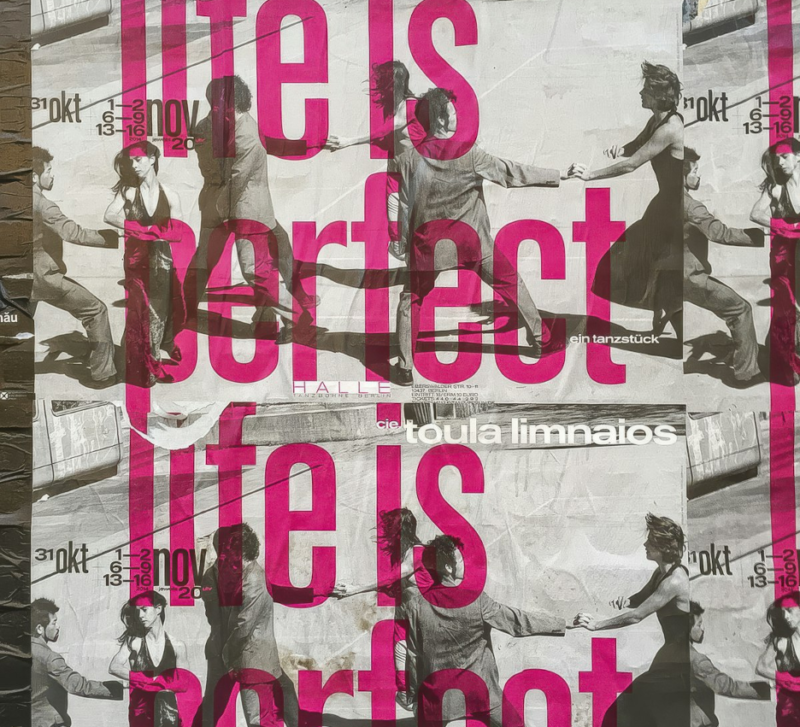
For years, the quickest way to spot an AI-generated image was to look at the text. Shop signs read like a forgotten alphabet, book covers carried words that almost made sense, and logos melted into abstract shapes. Designers learned to keep text out of prompts entirely and add it later in their layout software.
That is starting to change. The latest generation of image models can render headlines, labels and short paragraphs with far greater accuracy, and some can lay out a poster or packaging mockup with a recognisable typographic hierarchy. For anyone who works with type, this raises genuine questions. How good is generated lettering now? Where can it be trusted? And how should designers fold it into a professional workflow without lowering their standards?
Why text was so hard for image models
Image models learn from pictures, not from fonts. A model that has seen millions of photographs containing words learns what text tends to look like, but historically it had no strong internal sense of spelling, glyph structure or spacing. The result was lettering that resembled text from a distance and fell apart up close.
Newer models combine image generation with stronger language understanding and multi-step planning. Before drawing, they effectively decide what the text should say, where it belongs and how large it should be, then check the result. That planning step is why recent models can produce a poster where the headline is spelled correctly and sits in a sensible place.
What the current Pro-class models do well
Google’s Nano Banana Pro, built on Gemini 3 Pro Image, is a good example of the current state of the art for type-heavy images. It is designed for complex compositions and detailed edits, with native 4K output and a multi-step workflow that includes built-in quality analysis. In practice, models in this class handle several kinds of typographic work surprisingly well:
- Short headlines and titles on posters, thumbnails and covers, usually spelled correctly on the first or second attempt.
- Clear hierarchy between a headline, a subhead and a short line of supporting copy.
- Stylistic direction such as “condensed grotesque”, “hand-lettered script” or “art deco display face”, interpreted as a visual style rather than an exact font.
- Text in context: lettering on packaging, signage, storefronts and screens that follows perspective and surface texture.
They are still less reliable with long paragraphs, very small text, non-Latin scripts with complex shaping and exact reproduction of a specific licensed typeface.
A checklist before anything goes out
Better lettering is not perfect lettering. Every image with text in it should pass a quick review by someone who knows type.
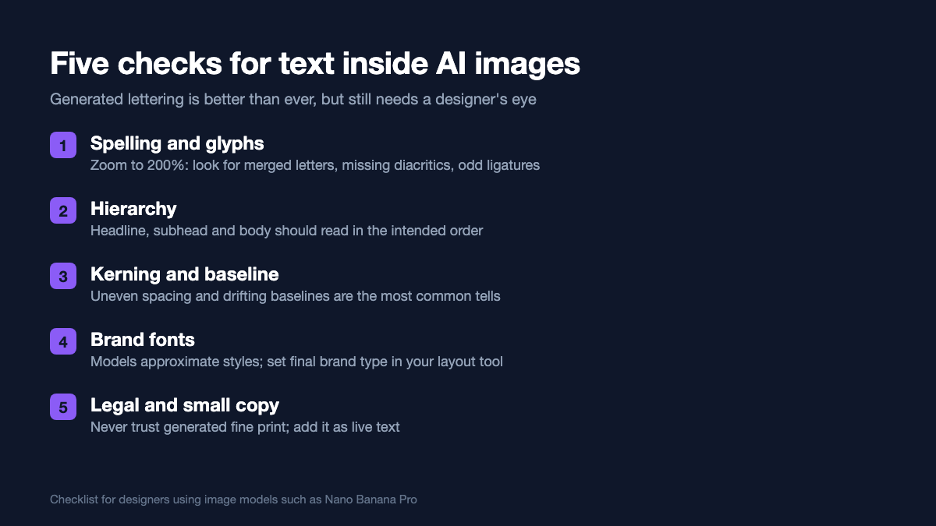
Zooming in is the most important habit. At thumbnail size, generated text often looks flawless. At 200 percent, merged letters, irregular stroke widths and slightly drifting baselines become obvious. Kerning is the most common giveaway: pairs such as “AV”, “To” and “rn” are frequently spaced in ways no type designer would accept.
Choosing between Pro and Flash models
Google offers two current image models, and the choice matters for type-heavy work. The Pro model spends more effort per image and is better at dense layouts and precise instructions. The Flash model, Nano Banana 2, is faster and cheaper and suits high-volume drafts.
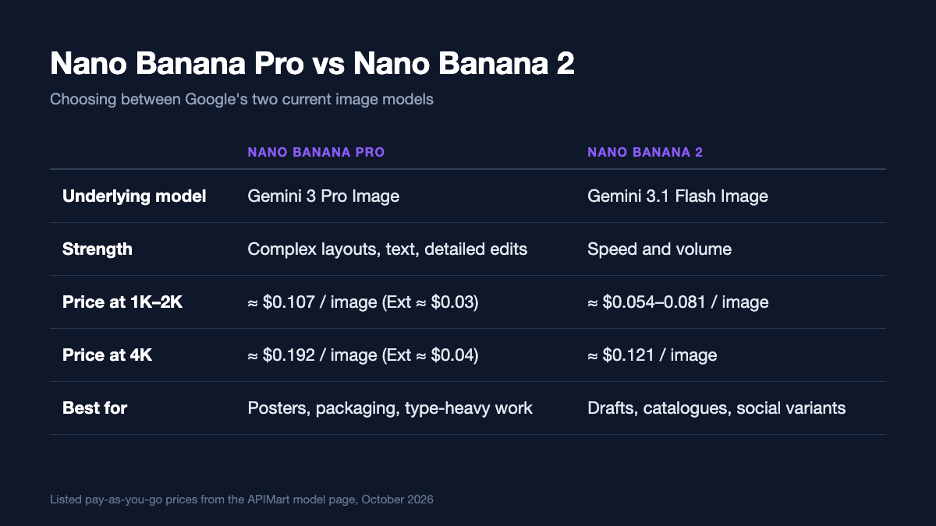
For developers and studios accessing the model programmatically, the Nano Banana Pro APIon APIMart lists the official route at about $0.107 per image at 1K or 2K and $0.192 at 4K, with a lower-cost Ext route at about $0.03 to $0.04 per image. For a designer exploring twenty poster concepts, that is a few dollars at most, which makes it practical to generate many directions before committing to one.
A professional workflow for type in generated images
| Stage | Let the model do it | Do it yourself |
| Concept exploration | Layout, mood, type style, rough headline | Choose directions to pursue |
| Composition | Placement and scale of text blocks | Check grid and margins |
| Display lettering | Expressive one-off headline treatments | Correct spacing and spelling |
| Brand typography | Approximate placeholders only | Set live text in licensed brand fonts |
| Body copy and legal text | Never | Always set as live, editable text |
The principle is simple: use generated lettering for exploration and expressive display work, and set anything functional, branded or legally significant as live text in your layout tool. This keeps the creative speed of AI while protecting accuracy and accessibility. Live text can be read by screen readers, translated, corrected and searched; text baked into pixels cannot.
Prompting for better lettering
A few prompt habits noticeably improve results. Put the exact text in quotation marks and keep it short. Describe the type style in plain terms, such as weight, width, era and mood, rather than naming a commercial typeface. Specify where the text should appear and how large it should be relative to the image. And ask for one text element at a time; a single strong headline is far more reliable than a headline, a subhead and three bullet points in one request.
Treat the model like a talented junior designer with an excellent eye and unreliable spelling. Give it clear direction, then check everything.
What this means for type designers and font licensing
Generated lettering raises understandable concerns in the type community. Models can imitate the general character of a typeface without reproducing its exact outlines, and that grey area is still being worked out legally and ethically. For commercial work, the safest approach is unchanged: final brand typography should use properly licensed fonts, set as real text. Generated lettering is best treated as a sketch, a mood reference or a bespoke one-off display treatment that a designer then refines.
AI image models have not solved typography, but they have crossed an important line. Text in generated images is now good enough to explore ideas quickly and, with careful review, to use for some display work. The designers who benefit most will be those who know exactly where to stop trusting the model and start setting type themselves.