
AI Video Maker Templates That Fit Tutorials, Tales, and Trends
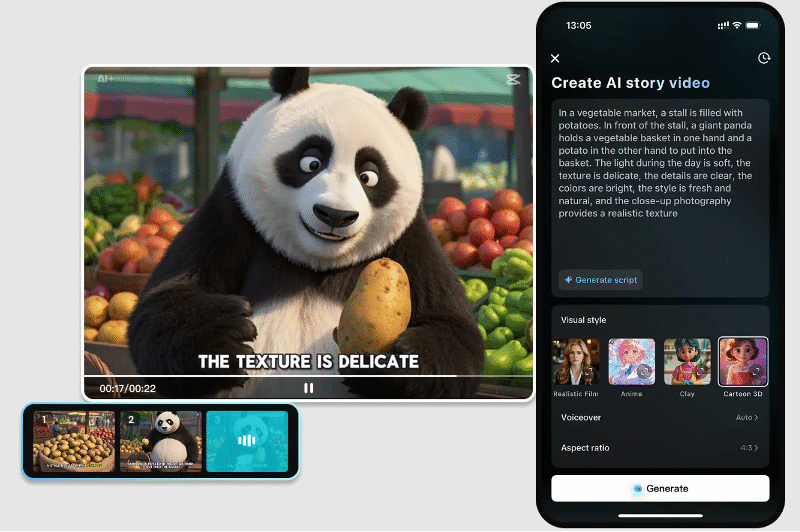
Templates are not merely stylistic fashions of appearance; they are also purposive. When applied correctly, they are effective in conveying powerful messages. The CapCut App simplifies the task through the assistance of templates, which can be used in storytelling, education, and trend tracking. These tools not only save time but also enhance the quality of videos produced by creators of all levels. Its AI video maker feature converts your script into an interesting piece with visual styles that suit you.
Template Classification by Video Purpose
Understanding the purpose of video will help you choose the most suitable template. The CapCut App categorizes templates according to their purpose, making the design process easier and quicker. When creating a tutorial, choose formats that are clear and instructive—these are ideal for how-to guides, product explanations, and DIY instructions. When creating stories, select narrative templates that evoke emotion, establish a setting, and develop a plot. It can be a fantasy world or a real-life story, but the flow matters. When riding a trend, choose formats that are similar to viral content. They can be used in TikTok challenges, daily vlogs, or hashtag events.
Tutorials in Education using Templates
Templates in instructions make reading and organization easy. The CapCut App offers a clever format, suitable for use regardless of whether the teacher is teaching science, a language, or even personal skills. The AI process provides subtitles, the structure of the scenes, and fluid transitions. This form guarantees viewers remain updated and entertained. Features such as auto-caption and visual aids make your message easier to understand. These are tools that help educators, opinion makers, professionals, and specialists convey complex concepts without confusing their audience. The templates facilitate the learning process through focused, pure storytelling.
AI Templates Storytelling: The Art of Telling Stories
Mood and pacing are essential when relating a story. Borrow templates designed around other genres like fantasy, horror, or history. CapCut App helps you structure your story with the aid of visuals, AI voices, and scene transitions. The AI lab will allow you to add digital avatars to dramatize. These avatars perform scenes, which add emotion and depth to your story. Storytelling templates also allow you to concentrate on the message rather than technical editing. The video output is smooth and immersive, with minimal effort.
Staying on Trends With Pre-designed Templates
The key to remaining relevant in social media is timing. The CapCut App has templates that are already prepared according to the existing style and viral content. These templates can be easily edited, either by replacing the text or media. This allows you to hop onto trends and stand out on the Internet quickly. It can be a meme template or a viral audio challenge, but these templates will put you ahead of the game. You can personalize them to represent everyday events or trending hashtags. This enables faster publication and ensures that the content remains fresh.
Template Crossing
The mixture of formats can create high-quality content. The CapCut App will enable you to mix template tutorials and storytelling. You may write educational fiction, e.g., morality tales, with academic content (life lessons or even scientific information). It is also possible to teach something through trends. Consider a viral video on climate change in 30 seconds. These mashup videos are successful as they are informative and entertaining. The CapCut App templates are flexible, allowing you to bend genres and experiment without sacrificing quality. It accommodates content that doesn’t fit in a single box.
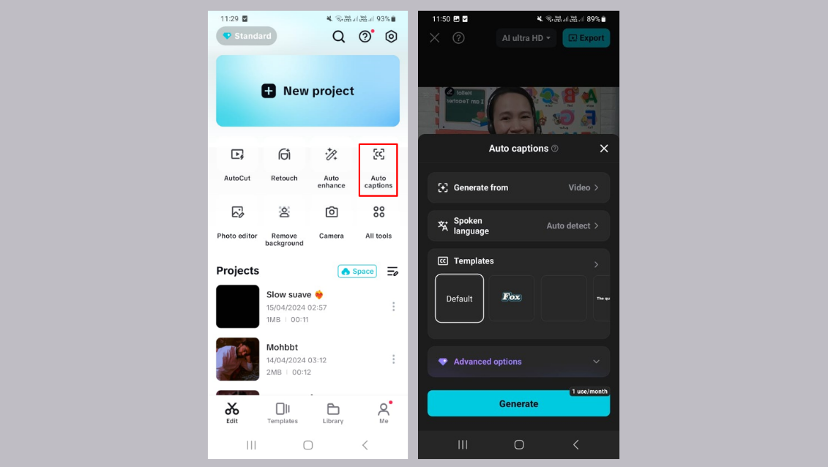
Adding clarity and emphasis to mixed content is also improved by the AI caption generator. It makes your viewers navigate through essential details with the sound muted. The text’s appearance will be under your control, and you will have creative freedom to match the tone and emotion.
Match Templates to Your Story Type
Step 1: Launch CapCut and browse templates
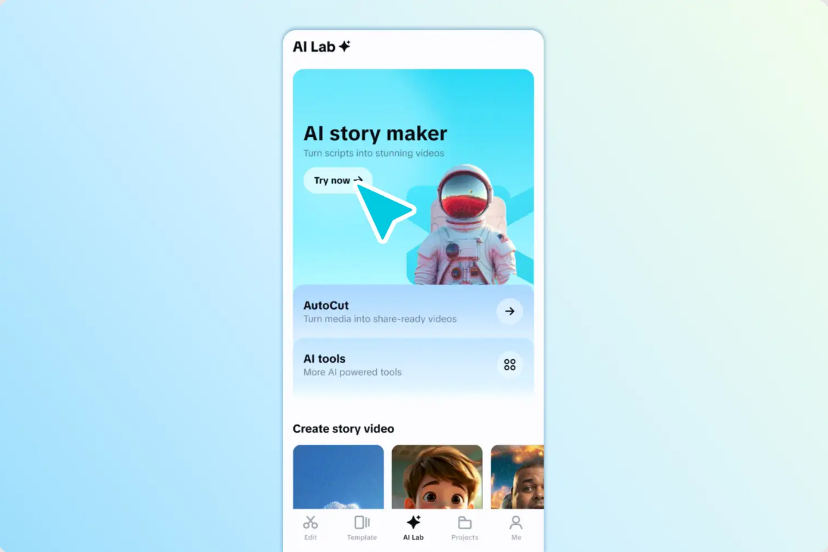
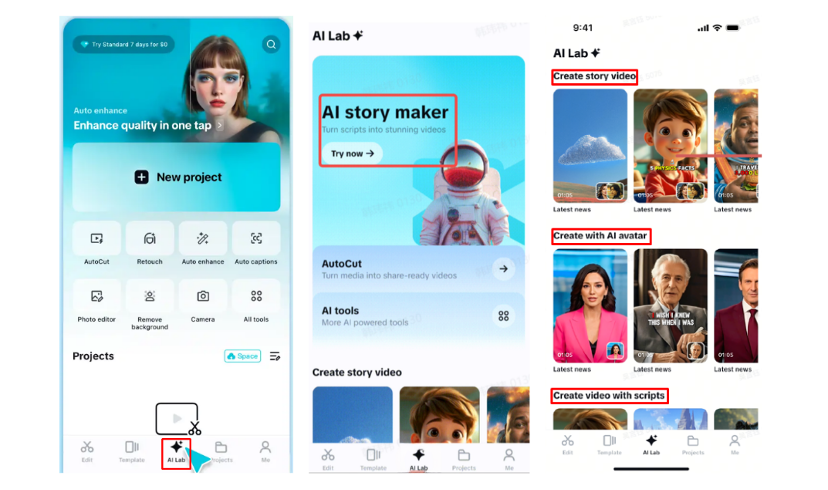
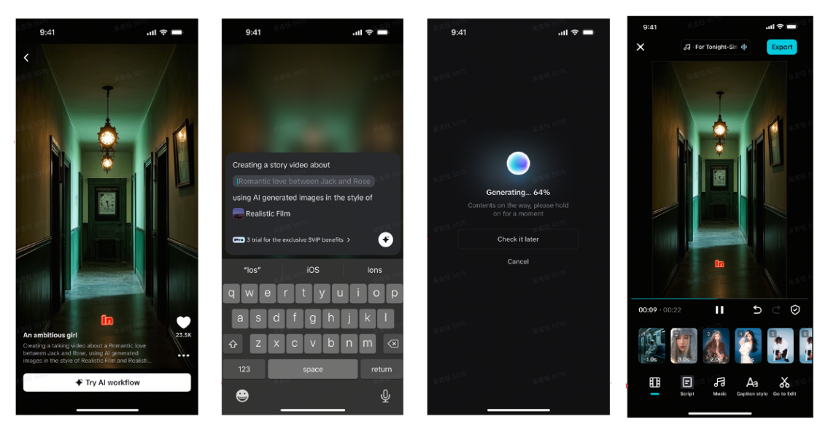
Start by launching CapCut and tapping on the “AI Lab” tab in the bottom menu. You’ll enter the “AI story maker” space. Look through templates like “Create story video”, “Create with AI avatar”, or “Create video with scripts”. Pick the one that fits whether you’re making tutorials, tales, or trendy clips.
Step 2: Craft and customize your story
After selecting the template, tap “Try AI workflow”. Add your video idea into the “creating a video story about” section. Then choose a visual style—go with “Realistic film”, “Cartoon 3D”, or “Anime” based on your story tone. Hit “Generate” to proceed.
When the AI delivers your video, you can refine it. Add sound from the “Music” tab. Style your captions via the “Caption style” tab by changing fonts, effects, or adding animation. Want full control? Tap “Go to Edit” and use tools like transitions, filters, and stickers.
Step 3: Export and share across platforms
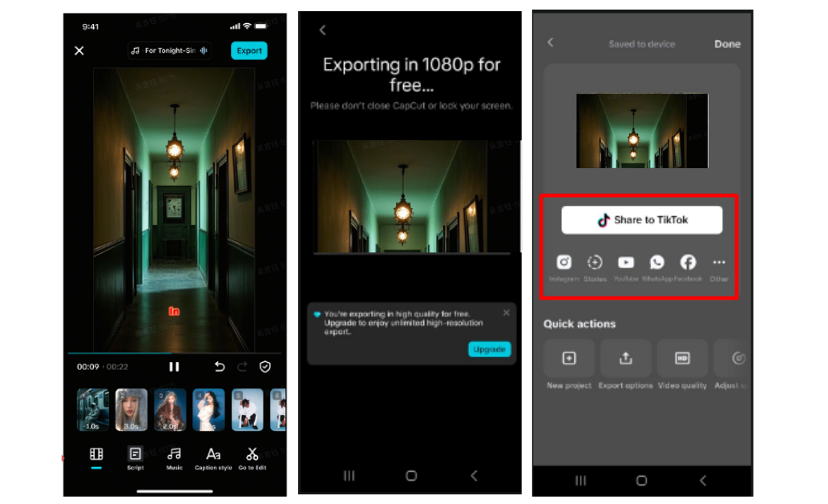
When you’re happy with your video, press “Export” at the top-right. The file saves automatically, ready for upload to TikTok, YouTube, or anywhere you want your story to shine.
Conclusion
The CapCut App removes creative limits through genre-specific templates. Whether making a tutorial, telling a story, or riding a trend, there’s a built-in workflow ready. You don’t need editing experience to produce quality videos. Just pick the right template, follow the steps, and start sharing.