
Download Amazon Prime Movies on Mac in 2 Methods 2025

Many people want to watch their favorite Amazon Prime movies and TV shows offline, especially when they’re traveling or don’t have a stable internet connection. If you’re a Mac user, you might be wondering if you can download Amazon Prime content directly to your MacBook. The answer is yes, but there are a few important things to know. This article will show you two different methods to download Amazon Prime videos on Mac, so you can watch them anywhere, anytime.
Part 1. Can I Download Movies from Amazon Prime to My MacBook?
Yes, you can download movies from Amazon Prime to your MacBook! Unlike some streaming platforms that limit offline viewing to mobile devices, Amazon Prime Video provides a dedicated Mac app that lets you download movies and TV shows directly for offline watching. This is the official and easiest way to save Prime Video content on your laptop.
However, the official method does have limitations: downloads are temporary, can expire after a certain time, and the files are protected so you can only watch them within the Prime Video app.
If you’re looking for a more flexible and permanent solution, using a reliable third-party Amazon Prime video downloader is an excellent alternative. It allows you to keep your favorite Amazon Prime titles on your MacBook without restrictions.
Part 2. How to Download Movies from Amazon Prime to My MacBook
Here are 2 methods for you to download movies from Amazon Prime to your MacBook.
Method 1: Download Movies from Amazon Prime to MacBook via the Official Way
This is the easiest and most common way to get your favorite Amazon Prime videos onto your Mac.
Here is how you can do it:
Step 1. Open the App Store: On your Mac, click the App Store icon in your Dock or search for it using Spotlight.
Step 2. Search for Prime Video: Use the search bar in the App Store to find the “Amazon Prime Video” app.
Step 3. Download and Install: Click the “Get” button and then “Install” to download the app to your Mac.
Step 4. Log In: Open the Prime Video app and sign in with your Amazon Prime account.
Step 5. Find Your Content: Browse or search for the movie or show you want to download.
Step 6. Start Downloading: On the movie’s or TV show’s details page, you will see a “Download” button. For TV shows, you can download a single episode or an entire season at once. Click the download icon, and the video will begin saving to your Mac.
Method 2: Download Movies from Amazon Prime to MacBook via Video Downloader
The official method is convenient, but the downloaded files are protected by DRM (Digital Rights Management). This means you can only watch them inside the Prime Video app, and they will expire after a certain period (usually 30 days, or 48 hours after you start watching).
For a permanent and more flexible solution, a third-party tool like Keepix Video Downloader can help. Keepix downloads Amazon Prime videos as standard MP4 or MKV files, so you can store them permanently and play them on any device.
Key Features of Keeprix Video Downloader:
- No time limits or regional restrictions
- DRM-free in MP4/MKV format
- Fast and stable downloads
- Windows and Mac are suppported
Downloading Amazon Prime Videos with Keepix Video Downloader:
Step 1. Download and launch Keeprix Video Downloader.
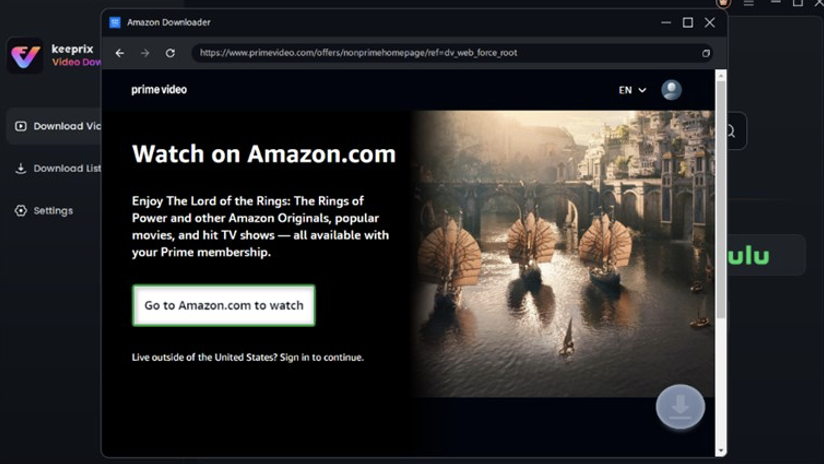
Step 2. Install Keeprix on your computer and open it. From the supported platforms, choose Amazon, then click “Go to Amazon.com to Watch” to proceed.
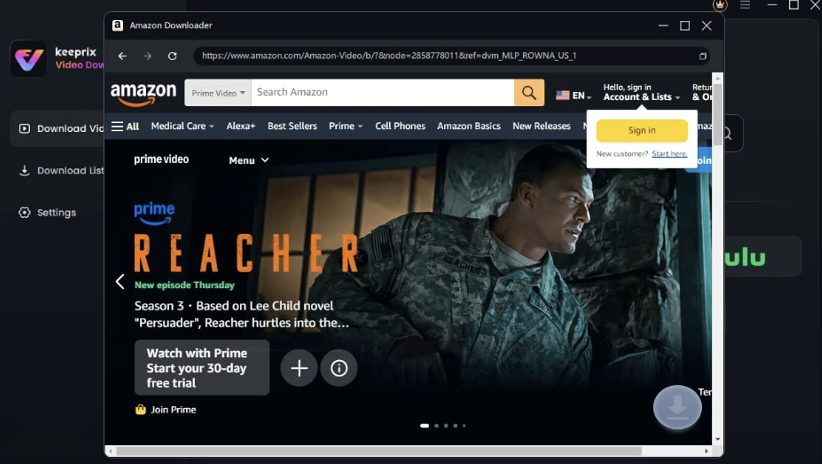
Step 3. Log in to your account as prompted. Then search for your chosen video by entering keywords in the search bar or pasting the video link directly and clicking the Download icon.
Step 4. Once the download is complete, view your saved content under the Completed tab for offline watching anytime.
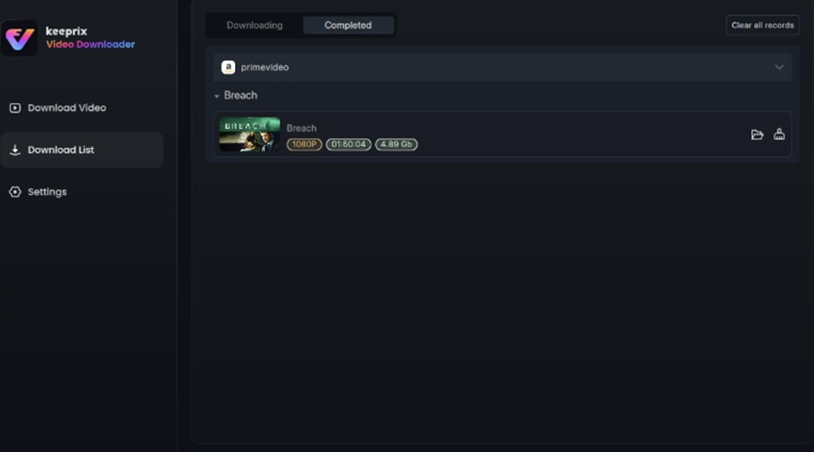
After that, you can transfer Amazon Prime Video downloads to your Mac and watch them without any restrictions.
Part 3. FAQs
Q1. Can I download movies from Prime Video to my computer?
Yes, you can. Amazon Prime Video offers an official app for both Windows and Mac that allows you to download and watch content offline. However, the downloads are temporary and can only be played within the app itself.
Q2. Where are downloaded Prime videos stored on a Mac?
When you download videos using the official Prime Video app, they are stored in a protected, hidden folder on your Mac. You cannot access these files directly or move them to another device. If you use a third-party downloader, the videos are saved as standard files in a folder you choose, making them easy to find and manage.
Q3. Why won’t Amazon Prime let me download movies?
There could be a few reasons:
- The content is not available for download: Not all movies and shows on Amazon Prime are downloadable.
- You’ve reached your download limit: Amazon Prime has a limit on the number of devices you can download to at one time. You may need to delete downloads from another device.
- Your subscription plan: The ability to download may vary based on your specific Prime Video subscription.
Part 4. Conclusion
Downloading movies from Amazon Prime to your Mac is easy and convenient. The official Prime Video app on the Mac App Store is the simplest way to watch videos offline. But if you want to keep the videos permanently, watch them on other devices, or have more control over your files, a third-party tool like Keepix Video Downloader is a better choice. Choose the method that best fits your needs, and enjoy your favorite Amazon Prime content without any internet worries!