
From 2D Inspiration to 3D Assets: How AI Is Changing the Designer Workflow
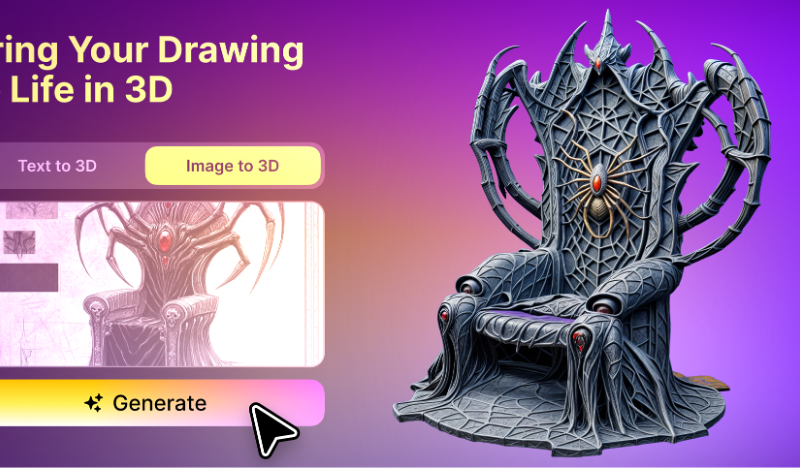
Most visual projects begin in two dimensions.
A designer collects references, builds a mood board, experiments with typography, tests color combinations, and arranges images until the direction starts to feel right. Whether the final project is a website, product campaign, packaging concept, game interface, or social media visual, the early stages often rely on flat images to communicate an idea.
That process is not disappearing. Typography, composition, color, and visual references are still fundamental to good design. What is changing is what designers can do with those references once a direction has been established.
AI-powered 3D tools are making it easier to turn sketches, illustrations, product photographs, and other 2D materials into three-dimensional assets. Instead of treating 3D as a separate and highly specialized stage of production, designers can begin exploring depth, materials, lighting, and form much earlier in the creative process.
The Traditional Gap Between 2D and 3D
Moving from a flat concept to a usable 3D model has traditionally required a different set of skills.
A designer might be comfortable creating a visual identity in Illustrator or building a campaign layout in Photoshop, but producing a 3D object usually means learning modeling software, understanding geometry, creating UV maps, applying textures, and preparing the asset for rendering.
For larger teams, these tasks may be handed to a dedicated 3D artist. For independent designers and smaller studios, however, that is not always practical. A simple 3D concept can take hours or days to produce, even when it is only needed for an early presentation.
This gap often causes designers to stay in 2D for longer than they would like. Three-dimensional ideas may be postponed until the concept is approved, which makes it harder to test how a design will behave in a more realistic or interactive environment.
AI does not remove the need for professional 3D work, but it can reduce the effort required to create a useful starting point.
Starting with the Reference Images Designers Already Use
One reason image-to-3D technology fits naturally into a design workflow is that designers already work with visual references.
A packaging designer may have a front-facing product sketch. A game designer may have concept art for a prop. A brand designer may have created a mascot illustration. A UI designer may want a dimensional object for a landing page or app interface.
These images already contain important information about shape, proportion, color, and style. An AI 3D tool can interpret some of that information and generate an initial model that can be viewed from multiple angles.
The result will not always be a finished production asset. It may still need changes to geometry, materials, scale, or texture. However, it gives the designer something concrete to evaluate.
Instead of asking whether an idea might work in 3D, the team can rotate it, place it in a scene, test it against a background, or use it in a presentation.
A Faster Path from Concept to Exploration
The most useful role of AI in design is often not completing the entire project. It is making experimentation less expensive.
When every 3D variation requires hours of manual modeling, designers naturally become more selective about which ideas they explore. When an initial model can be generated quickly, it becomes easier to compare several directions before committing to one.
For example, a designer could:
- Turn several mascot sketches into rough 3D concepts
- Compare different product shapes in a campaign mockup
- Test whether an illustrated object works as a dimensional website element
- Create a preliminary game prop from concept art
- Explore how a graphic symbol might look as a physical object
- Prepare a rough model for a client presentation
This changes 3D from a final production task into a creative thinking tool.
A rough model does not need perfect topology or final-quality materials to be useful. During the early stages, its purpose may simply be to help people understand scale, volume, perspective, and visual balance.
Bringing 3D into Branding and Digital Design
Three-dimensional elements are no longer limited to animation studios and game development.
Brands increasingly use 3D illustrations, virtual products, dimensional typography, animated objects, and digital mascots across websites, campaigns, social media, and product launches. These assets can help create a more recognizable visual world around a brand.
For designers, this creates both an opportunity and a challenge. Clients may expect richer and more dynamic visuals, but not every project has the budget or schedule for a complete 3D production pipeline.
AI-assisted creation offers a middle ground.
A designer can begin with a familiar 2D reference and use a tool such as Meshy to convert it into a textured 3D model. The model can then be exported in formats such as OBJ, FBX, GLB, or STL, depending on how it will be used.
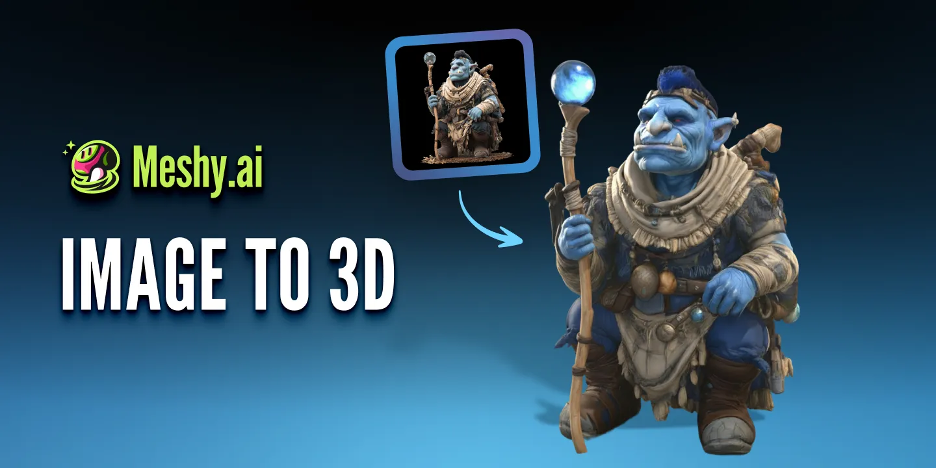
A GLB file might be prepared for an interactive web experience. An OBJ or FBX asset could move into another 3D application for further editing. An STL file may be useful when the concept is intended for physical prototyping or 3D printing.
The value is not only speed. It is the ability to connect visual design work with more possible outputs.
What Makes a Good Image-to-3D Reference
Although AI tools can simplify the conversion process, the quality of the source image still matters.
Clear references usually produce more useful starting points than visually complicated ones. Designers can improve the result by preparing the image before generating the model.
A strong reference image often has:
- A clearly defined subject
- Good contrast between the object and background
- A readable silhouette
- Minimal visual obstruction
- Consistent lighting
- Enough detail to communicate materials and surface features
Images with overlapping objects, extreme perspective, heavy shadows, or unclear edges may be harder for the system to interpret.
It is also important to consider what the original image does not show. A single front-facing image contains limited information about the back and sides of an object. AI has to estimate those missing areas, so they should be reviewed rather than assumed to be accurate.
For important assets, multiple references or further manual refinement may still be necessary.
AI Generation Is the Beginning Not the Final Decision
The growing accessibility of AI 3D tools can create the impression that designers only need to upload an image and accept whatever comes back. In practice, the best results still depend on creative judgment.
A designer needs to decide whether the generated form matches the original concept. The proportions may need adjustment. Textures may need to be simplified or replaced. The object may need to be optimized for a website, game engine, animation, or 3D printer.
These decisions are not minor details. They determine whether the asset communicates the intended idea and works in its final environment.
AI can shorten the distance between inspiration and a testable model, but it does not decide what is appropriate for the project. It does not understand a brand strategy, audience expectation, or creative brief in the same way a designer does.
The designer remains responsible for direction, selection, and refinement.
A More Connected Creative Workflow
The larger shift is not simply that AI can produce 3D models. It is that the boundaries between design disciplines are becoming less rigid.
A graphic designer can explore a three-dimensional brand element without first becoming an expert modeler. A product designer can test a visual reference as a spatial object. A content creator can turn an illustration into an asset for animation or social media. A small game team can develop early props before assigning them to a full production pipeline.
An AI 3D model generator can also help designers move between different starting points. Some projects may begin with a reference image, while others begin with a written description or a rough concept that has not yet been illustrated. Having both options makes it easier to test ideas before investing in detailed manual production.
This does not eliminate specialization. Professional 3D artists remain essential for complex geometry, animation-ready topology, detailed materials, rigging, lighting, and final rendering.
What it does change is access. More designers can now include 3D thinking in the early stages of a project rather than treating it as something that happens only after the main creative decisions have been made.
From Flat References to Flexible Assets
Designers will continue to begin with fonts, images, sketches, color palettes, and mood boards. These are the tools that help ideas take shape.
But the journey no longer has to stop at a flat composition.
With AI-assisted image-to-3D workflows, a visual reference can become a model that can be viewed, tested, edited, animated, printed, or placed inside an interactive experience. Even when the first result requires refinement, it creates a faster route from imagination to something tangible.
The most meaningful change is not that AI is replacing the designer’s process. It is giving that process more dimensions.
FAQs
Can I use Meshy to turn a font logo or brand illustration into a 3D model?
Yes. Meshy’s image-to-3D workflow can use a clear font logo, lettering graphic, mascot, or brand illustration as a visual reference for creating an initial 3D asset.
For better results, the image should have a clear silhouette, strong contrast, and a simple or transparent background. Fine decorative lines, overlapping letters, and heavy shadows may make the shape more difficult to interpret.
Because a single image does not define the object’s thickness, back, or hidden surfaces, the generated model should be treated as a starting point. Designers may still need to adjust the depth, edges, proportions, textures, and brand colours before using it in a finished campaign.
The workflow can be particularly useful for developing logo mockups, motion graphics, website visuals, virtual displays, and early brand concepts.
What types of brand artwork work best for image-to-3D generation?
Simple artwork with one main subject usually produces the clearest result. Bold lettering, isolated icons, mascots, packaging symbols, and illustrations with easily recognisable outlines are generally easier to translate into 3D than highly detailed compositions.
If the design contains several small elements, it may help to separate them and generate each part individually.
Will the generated model preserve the original font exactly?
Not always. The generated model is a visual interpretation of the reference image rather than an editable font file.
Letter spacing, curves, small counters, sharp corners, and fine typographic details may change during generation. For applications that require exact brand consistency, designers should compare the result with the original logo and refine the geometry manually.