
How to Remove Video Background for Free Using AI Tools (2026 Guide)
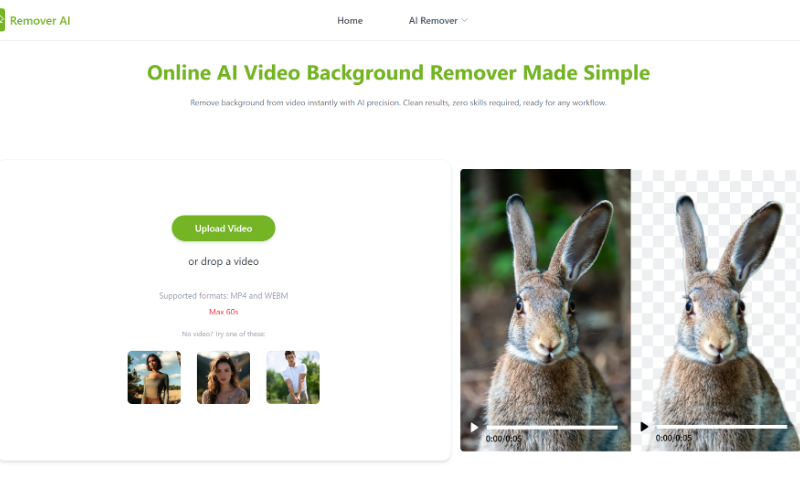
In 2026, video content dominates the internet. From social media platforms to business marketing campaigns, videos are now one of the most effective ways to capture attention and communicate messages. However, not every video is recorded in a perfect environment. Distracting backgrounds, cluttered spaces, or unwanted elements can reduce the overall quality of your content.
This is where a free video background remover becomes a game-changing tool. Thanks to advancements in artificial intelligence (AI), removing and replacing video backgrounds is no longer limited to professionals with expensive software. Today, anyone can achieve studio-quality results using simple, accessible tools like Remover AI.
What Is a Video Background Remover?
A video background remover is an AI-powered tool that automatically detects the subject in a video and separates it from the background. This process, often referred to as “background removal” or “video segmentation,” allows users to replace the background with something else—such as a solid color, an image, or another video.
In the past, this process required green screens and complex editing software. Now, with a free video background remover, you can achieve similar results without any special equipment.
Why Use a Free Video Background Remover?
There are several reasons why people are turning to AI tools for video editing:
- Cost-Effective
Traditional video editing software can be expensive. Free tools eliminate this barrier, making high-quality editing accessible to everyone. - Easy to Use
Most AI tools are designed for beginners. You don’t need technical skills—just upload your video and let the tool do the work. - Time-Saving
Manual background removal can take hours. AI tools complete the process in minutes. - Professional Results
Despite being free, many tools deliver impressive, studio-like outcomes.
Platforms like Remover AI combine all these benefits, making them a popular choice for creators and businesses alike.
Step-by-Step Guide: How to Remove Video Background for Free
Here’s a simple step-by-step process to remove a video background using AI tools like Remover AI:
Step 1: Choose a Free AI Tool
Start by selecting a reliable free video background remover. Look for tools that offer good quality output, fast processing, and an easy interface. Remover AI is a great option for beginners and professionals alike.
Step 2: Upload Your Video
Once you’ve selected your tool, upload the video you want to edit. Most platforms support common formats like MP4, MOV, and AVI.
Make sure your video is clear and well-lit, as this helps the AI detect the subject more accurately.
Step 3: Let AI Process the Video
After uploading, the AI will automatically analyze your video. It identifies the main subject and removes the background frame by frame.
This process usually takes a few seconds to a few minutes, depending on the length and quality of the video.
Step 4: Choose a New Background
Once the background is removed, you can replace it with:
- A solid color (for professional presentations)
- An image (for creative projects)
- Another video (for dynamic content)
Remover AI provides multiple options to customize your background according to your needs.
Step 5: Preview and Adjust
Before finalizing, preview your video. Check for any imperfections or areas where the background removal might need slight adjustments.
Some tools allow minor refinements to improve the final result.
Step 6: Download Your Video
Once you’re satisfied, download the edited video. You now have a clean, professional-looking video ready to share.
Tips for Better Results
To get the best output from a free video background remover, follow these tips:
- Use good lighting: Proper lighting helps the AI distinguish between the subject and background.
- Avoid complex backgrounds: Simple backgrounds improve accuracy.
- Wear contrasting colors: This makes it easier for the AI to detect edges.
- Keep movements smooth: Sudden movements can sometimes affect the quality of background removal.
By following these tips, you can significantly enhance your results using tools like Remover AI.
Common Use Cases
A free video background remover can be used in many different scenarios:
- Content Creation
YouTubers and social media influencers can create engaging videos with customized backgrounds. - Business and Marketing
Companies can produce professional promotional videos without needing a studio setup. - Online Meetings and Presentations
Replace messy backgrounds with clean, distraction-free visuals. - Education and Tutorials
Teachers and trainers can create visually appealing educational content. - Entertainment and Creative Projects
Filmmakers and hobbyists can experiment with unique backgrounds and effects.
Advantages of Using Remover AI
Remover AI stands out as a reliable solution for background removal due to its:
- User-friendly interface
- Fast AI processing
- High-quality output
- Free access to essential features
It simplifies the entire editing process, making it accessible even for users with no prior experience.
Limitations to Keep in Mind
While AI tools are powerful, they are not perfect. Some limitations include:
- Difficulty with complex or moving backgrounds
- Reduced accuracy in low-light conditions
- Possible quality limitations in free versions
However, continuous improvements in AI technology are rapidly addressing these challenges.
The Future of AI Video Editing
AI is transforming video editing at an incredible pace. In the near future, we can expect:
- More accurate background detection
- Real-time editing capabilities
- Integration with social media platforms
- Advanced customization options
Tools like Remover AI are leading this evolution, making professional video editing accessible to everyone.
Conclusion
A free video background remover is no longer just a convenience—it’s an essential tool for modern content creation. With AI-powered platforms like Remover AI, anyone can remove and replace video backgrounds efficiently.
Whether you’re a content creator, business owner, or casual user, these tools empower you to produce high-quality videos without expensive equipment or technical expertise.
As we move further into 2026, the combination of AI and accessibility will continue to reshape how we create and edit videos—making professional results achievable for everyone.