
Icons8: a practical field guide for people who ship design
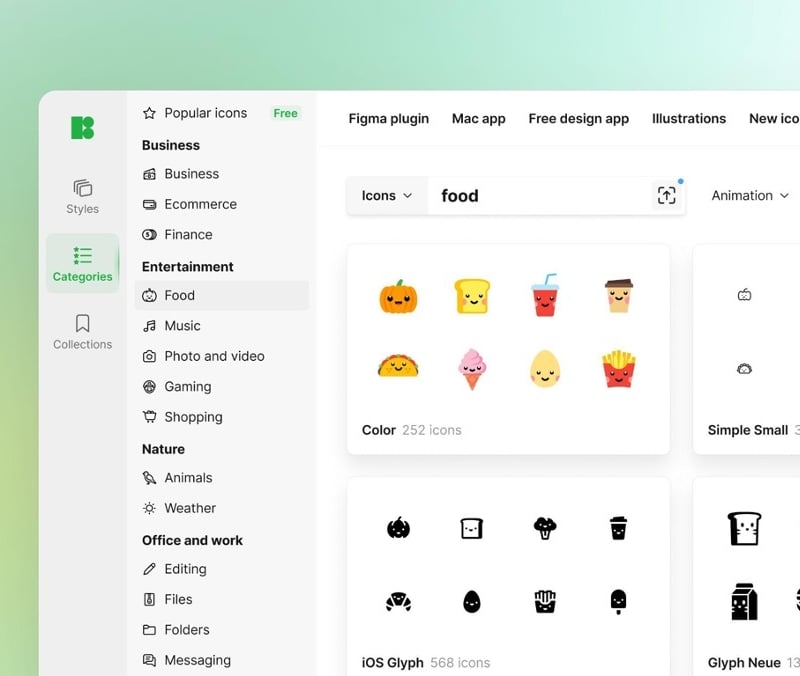
You do not need another vague ode to icon libraries. You need to know what you get, where it fits in a real workflow, and what can break. I spent time going through Icons8’s icon ecosystem, its plugins, desktop app, API, formats, and license. Below is the no nonsense take aimed at designers, developers, students, marketers, content teams, startups, and teachers who want consistent UI and fast handoffs without hunting across ten sites.
Coverage and consistency
Icons8 lists 1,464,800 icons on its catalog page. That number is not marketing fog; it sits right on the index and grows as new packs land. You can search across styles, topics, and formats from a single place, including static and animated sets in PNG, SVG, GIF, Lottie JSON, and even After Effects project files for motion teams. The headline “4,500+ animated icons” matters if you are building product onboarding or microinteractions and want motion assets you can actually edit.
The win here is consistency across very large packs. When you must roll a dashboard for web, iOS, and Android, mixed sources produce slightly different corner radii, line thickness, and perspective. Icons8’s big sets keep those variables locked, which reduces QA time and keeps a brand system from looking stitched together. The library offers multiple design languages, such as iOS glyph, Windows 11 color, line, glyph neue, and others, so a team can match the platform while keeping visual rhythm. These style families are discoverable from their listings and plugin docs.
Formats and why they matter
You can grab PNG for quick content work, SVG for product UI, and native motion formats for anything that animates. Lottie JSON drops straight into mobile and web without video export headaches, and the After Effects files help motion designers retime or recolor assets at the source. If you live in a component library, SVG is the baseline. Instead of creating messy traces with unnecessary nodes, AI-powered image to SVG conversion uses vectorization algorithms to recognize shapes, curves, colors, and structure, turning PNG, JPG, or WebP artwork into clean, editable vector files for logos, icons, illustrations, characters, and web graphics. If you are shipping a marketing site, PNG often wins on speed for social and blog banners. All of these are explicit on the catalog pages, which avoids guessing whether a set is usable beyond a screenshot.
Search, plugins, and the time tax you do not want to pay
Hopping between browser tabs creates context switching. Icons8 reduces that with plugins for Figma. The main plugin surfaces over a million graphics inside Figma, so you can drag assets onto the canvas without leaving the tool. The public plugin pages show install counts and the scope of content, including Material icons coverage and Icons8’s own additions for areas where the Google pack is thin. There is also a Background Remover plugin for quick cutouts when you are mocking up visuals.
Two details are useful in practice. First, the Figma listing calls out a very large user base, which signals maintenance and support are not a side project. Second, Icons8 has a plugin called Steez that proposes replacements for old icons in a Figma file. This can accelerate cleanup on legacy files where teams used mismatched sources.
Offline access for teams with strict environments
If your company restricts cloud access or your conference Wi Fi disappears right before a stakeholder review, a desktop option matters. Pichon is Icons8’s lightweight desktop app that houses their assets for offline use. It is a native app for Windows and macOS. Community threads mention an offline mode for icons only. RAM usage and Apple Silicon support are discussed by users, which gives a realistic picture of performance constraints and platform behavior.
An API for developers and CMS builders
If you are integrating icons into an internal CMS, a design system site, or a template marketplace, the Icons8 API exposes search and retrieval across many design styles. The docs include endpoints to fetch by id, to query by style, and rate details, and the platform reports serving hundreds of thousands of requests daily to third party apps. This is not a weekend script; it is production infrastructure with live customers. Names on the developer pages include recognizable products across presentation, e commerce, and video editing.
On the engineering side, pulling SVG via API and converting to sprites or React components is straightforward. You can build an internal icon picker, record chosen ids in your design tokens, and auto sync those tokens to both code and Figma. The value is repeatability. Fewer one off uploads, more single source of truth.
Licensing and attribution, told plainly
The free license requires attribution. You must link to icons8.com where you use the content. This can live in a footer if the usage spans most of your pages. Community guidance clarifies that an About page link is acceptable if you cannot place it on the main page, which helps for products with strict layout constraints. If you do not want attribution, you buy a paid plan and proceed without linking. but the license explainer and forum posts make the rules explicit.
For students and teachers, the free with attribution route is usually fine. For funded startups and commercial teams, skip the link requirement and purchase the commercial license to avoid legal entropy. If you run an open source project, read the forum note that mentions two hyperlinks for free accounts and check whether your README and website can host them. It is specific, and it is better to wire it in once instead of fixing after launch.
Where Icons8 fits different users
Product designers
Large, style consistent sets mean fewer visual mismatches when assembling flows. Animated icons in Lottie and AE help you prototype motion in onboarding, empty states, and success toasts without commissioning custom work for every small interaction. This is especially effective when you are on a tight timeline and need motion that still looks designed.
Developers
The API saves you from shipping a monolithic icon font or manual imports from random sources. Fetch only the icons you need, cache them, version them with your design tokens, and keep the UI crisp across themes. The documentation shows straightforward endpoints to pull icons by id and style.
Design students
Consistency trains your eye faster. Download a style family and rebuild a small app UI with it. Switch to another family and compare how weight, corner radii, and perspective change the feel. Because the library spans many platform idioms, you get a structured way to learn visual language instead of chasing ad hoc files.
Marketers and content managers
Blog posts and landing pages benefit from quick, on brand visuals. You can pull PNGs for articles and social cards, keep attribution in the footer or About page if you use the free tier, and keep your editorial calendar moving. For motion heavy assets, convert Lottie to short loops to break up text in long scroll landing pages.
Startups
In the early months you need velocity. A big, internally consistent set beats a mood board of random SVGs. You can lock a style once, set up the Figma plugin for the team, and remove the weekly debate around which icon to use for filters or settings. The API later becomes useful for a settings themer or a documentation site.
Educational projects and teachers
Teaching UI basics is easier with cross style comparisons. Assign students to redesign the same screen with iOS glyph, Windows 11 color, and a monochrome line set. Discuss readability at small sizes, stroke weight, and cultural expectations for pictograms. The sheer volume of Icons8’s catalog lets you run such exercises without hitting missing items.
Search details that help at scale
Icons8 supports visual search by image and keyword. The practical use case is replacing a tired icon in a legacy file when you do not know its name. Drag a screenshot into the site, map it to a family that fits your current UI, and swap globally through your components. The Figma plugin’s Steez feature also aims at this, proposing replacements automatically, which speeds up cleanup work before a release.
Animated icons are not a novelty here
Motion is easiest to justify when it solves a real UX problem. Empty states need a little life, background uploads benefit from a hint of progress, and premium upgrades need a moment of delight that does not turn into a carnival. Having 4,500 plus animated icons in Lottie and AE directly addresses that, and it comes from an in house motion team. This cuts down the drift you see when freelancers build a few pieces in styles that fail to match each other.
The middle of the stack social use case
Some teams end up rebuilding social icons every quarter to match evolving brand guidelines. Icons8 hosts current versions of popular brand marks in multiple styles. If you need a facebook icon that matches your monochrome footer, your color CTA bar, and your mobile header, you can pull variants from the same family and keep them aligned. This reduces the number of bespoke SVG tweaks living in your repo.
Desktop app realities
Pichon matters for air gapped environments and travel. The official docs position it as a lightweight catalog for icons, photos, and illustrations. You can browse, drag, and drop into your tools, then keep using those downloads offline. Community notes point to an offline install with icons only, useful for teams with tight security policies. If your team is on managed macOS with Apple Silicon, forum discussions highlight real world behavior. That is not a guarantee for every edge case, but it is evidence that the tool runs in something closer to the real world than a marketing screenshot.
What this means for handoff and governance
If you already run a design system, the combination of a consistent library, Figma plugin, and an API lets you centralize icon choice. You can encode style families into tokens, generate React components from SVG ids, and eliminate the classic drift where marketing grabs glossy color icons and product ships thinner glyphs. When you onboard new designers, a single plugin and a single style guide page are all they need to find the right assets.
Cost, license, and risk
There is a cost to “free.” Attribution is required on the free tier. The license page states a link to icons8.com must be present where the content appears and shows placement examples. If you cannot or do not want to link, get a commercial plan and move on. Community notes clarify options for placement, including About pages, which is useful for products with rigid layouts.
For open source maintainers, older community notes indicate a two link requirement for free accounts, one to icons8.com and a second to the specific asset. If your project is public, you can meet that in the README and in the docs site footer. Plan it once, document it for contributors, and you are done.
Practical setup checklist
- Pick a style family that matches your product platform. Document stroke weights and sizing guidelines in your design system.
- Install the Figma plugin for the whole team. Lock a version of social icons that match your brand.
- For product code, wire the Icons8 API to fetch SVG by id, then wrap exports into framework components. Keep ids in tokens.
- If you need offline reliability, deploy Pichon for designers who travel or work under restricted networks.
- Decide on license mode. Free with attribution for education and experiments, commercial license for shipped products that cannot display links. Use the license page guidance to place the link once and forget about it.