
Preserving the Past: How to Restore and Sharpen Decades-Old Scanned Family Photographs
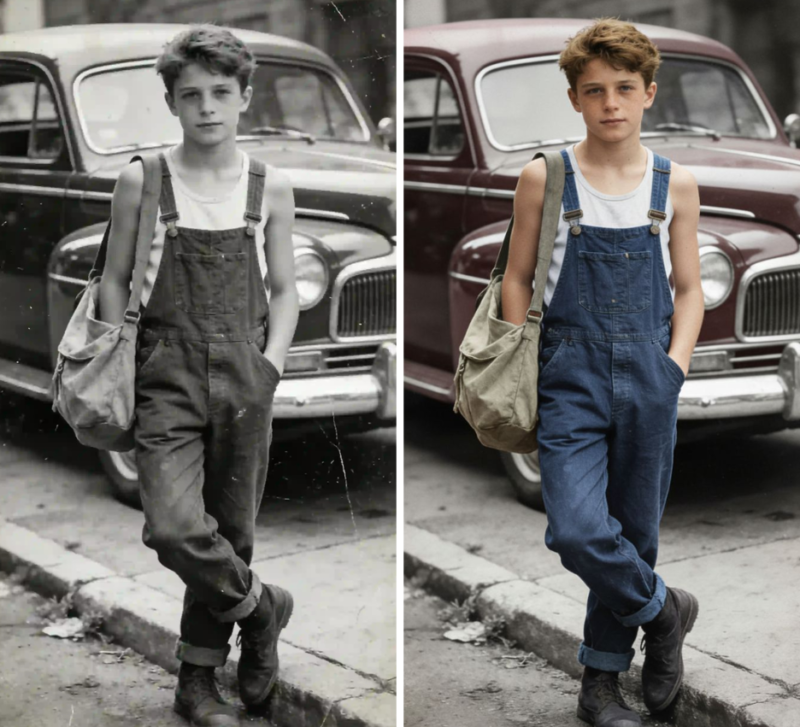
Old family photographs are more than just paper and ink. They are windows to our past, holding priceless memories of loved ones, special occasions, and moments that define our history. The problem is that these physical treasures degrade over time. Colors fade, details blur, and physical damage can obscure the faces we long to see clearly. Fortunately, modern technology gives us the power to turn back the clock, restoring these cherished images to their original glory.
This guide explores practical ways you can bring old, scanned family photographs back to life. We will look at real-world situations where photo restoration makes a significant impact, from reviving faded wedding portraits to sharpening blurry childhood snapshots. Preserving your family’s legacy has never been more accessible.
Real-World Photo Restoration Scenarios
Let’s explore a few common situations where digital restoration can make a world of difference. Each scenario presents unique challenges, but the goal is always the same: to recover and preserve a precious memory.
Use Case 1: Reviving Faded Wedding Albums
Imagine finding your parents’ or grandparents’ wedding album. The photos are beautiful, but the vibrant colors have washed out over the decades, leaving a yellowish or faded tint. The sharp details of the wedding dress, the flowers, and the happy smiles have softened, losing their impact. This is one of the most common issues with color photographs from the 1960s, 70s, and 80s.
The solution is digital color correction and enhancement. By scanning these photos, you create a digital canvas to work on. Specialized software can analyze the faded image and intelligently reintroduce accurate colors. It can restore the brilliant white of a wedding gown, the rich tones of a suit, and the natural skin tones of the people in the photo. This process goes beyond a simple saturation boost, it aims to recreate the authentic color palette of the original scene.
The primary benefit here is emotional resonance. When you restore the colors, you’re not just making the picture look better, you’re bringing the memory back to life with the vibrancy it deserves. A restored wedding photo allows younger generations to see the event as it truly was, full of life and color. It becomes a more powerful and engaging piece of family history.
Use Case 2: Sharpening Blurry Childhood Candids
Think about those candid photos from your childhood. Many were taken with simple point-and-shoot cameras that often struggled with focus, especially in low light or with moving subjects. The result is a collection of memories that are slightly soft or blurry, obscuring the details of a facial expression or the setting of a cherished moment. These images hold immense sentimental value but lack the clarity we wish they had.
This is where AI-powered tools can work wonders. Instead of just applying a generic sharpening filter, modern algorithms can analyze the image to understand why it’s blurry. They can correct for motion blur or a missed focus, reconstructing details that seem lost. Using an AI tool to Unblur Image files can transform a soft, fuzzy photo into a crisp and clear memory. The technology intelligently redraws edges and textures without creating artificial-looking halos or artifacts.
By sharpening these candid shots, you recover the small details that tell the full story. You can suddenly see the specific toy you were playing with, the pattern on the wallpaper in your childhood home, or the mischievous glint in your sibling’s eye. This newfound clarity makes the memories more immediate and tangible, allowing you to share them with a new level of detail and emotion. It bridges the gap between a fuzzy recollection and a vivid memory.
Use Case 3: Repairing Damaged Ancestral Portraits
Older photographs, especially those from the early 20th century or before, often suffer from physical damage. Scratches, dust spots, creases from being folded, or even tears can mar the surface of an ancestral portrait. These imperfections can be distracting and, in some cases, obscure key parts of the image, like the face of a great-great-grandparent you never met. Preserving these images is crucial, as they are often the only visual link to past generations.
Digital restoration offers a powerful way to repair this damage. Once scanned, software can be used to meticulously remove these blemishes. Tools can clone textures from undamaged parts of the photo to fill in cracks or tears seamlessly. Dust and scratch removal algorithms can clean up the image without softening important details. This is delicate work, but the results can be astonishing, making a 100-year-old photograph look like it was taken recently. It is even possible to use AI tools that can intelligently reconstruct missing parts of a face or clothing.
The benefit of repairing these portraits is immense. It allows you to connect with your ancestry on a deeper level. A clean, repaired portrait lets you look directly into the eyes of your ancestors without the distraction of age and damage. It makes them feel more real and present. These restored images become treasured heirlooms that can be passed down, ensuring your family’s history is preserved for generations to come.
Use Case 4: Digitizing and Enhancing Old Home Movies
Our visual history isn’t limited to still photographs. Many families have reels of 8mm film or boxes of VHS tapes containing irreplaceable home movies. Like photos, this footage degrades over time. Film becomes brittle and faded, while magnetic tapes lose their signal, resulting in grainy, low-resolution videos with washed-out colors. These moving pictures of childhood birthday parties, family vacations, and holiday gatherings are too precious to lose.
The process of digitizing and enhancing this footage is another key aspect of preserving family history. Once the film or tape is converted to a digital file, you can use a Video Enhancer to dramatically improve its quality. These tools can increase the resolution, reduce grain and noise, stabilize shaky footage, and restore colors. An old, blurry standard-definition video can be upscaled to high definition, making it enjoyable to watch on modern TVs and devices.
Enhancing old home movies transforms them from fuzzy, forgotten relics into engaging films that your family can enjoy together. The improved clarity and color make the viewing experience far more immersive. It’s a wonderful way to reintroduce younger family members to relatives they never knew and share stories in a dynamic, moving format.
A Practical Workflow for Photo Restoration
Restoring your family photos might sound technical, but the process can be broken down into a few manageable steps. Here is a simple workflow to get you started.
Step 1: Create a High-Quality Scan
The restoration process begins with a good digital copy. Don’t take a picture of the photo with your phone. Instead, use a flatbed scanner to capture the image. Set the scanning resolution to at least 600 DPI (dots per inch) for small photos and 300 DPI for larger ones. This ensures you have enough detail to work with. Save the file in a lossless format like TIFF for the best quality, or a high-quality JPEG if space is a concern.
Step 2: Make Initial Adjustments
Open your scanned image in a photo editing tool. Start with the basics. Crop the image to remove any scanner bed edges and straighten it if it’s crooked. Then, adjust the overall brightness and contrast to bring back some initial life to the image. This creates a solid foundation before you move on to more specific repairs.
Step 3: Color Correction and Repair
Now, focus on the color. Use your software’s color correction tools to fix any fading or color casts. Many programs have an “auto-correct” feature that works well as a starting point. After fixing the color, zoom in and look for physical damage like scratches, dust, or creases. Use spot healing or clone stamp tools to carefully remove these imperfections. This step requires patience but makes a huge difference.
Step 4: Sharpening and Final Touches
Once the image is clean and the color is balanced, it’s time to address any softness or blur. Use a sharpening tool to enhance the details. Be subtle, as over-sharpening can make the photo look unnatural. This is where AI-powered sharpening and unblurring tools can be particularly effective, as they add clarity without creating harsh edges. After sharpening, give the photo one last look and make any minor adjustments needed.
Step 5: Save and Archive Your Work
Save the final, restored image as a new file. It’s a good practice to keep your original scan untouched, so you can always go back to it. Save the restored version as a high-quality JPEG for easy sharing and viewing. Finally, back up your digital photo collection in multiple places, such as on an external hard drive and a cloud storage service, to ensure it’s safe for the future.
Conclusion
Every old photograph in your family’s collection is a piece of a larger story. By restoring these images, you do more than just fix faded colors or blurry details. You are actively preserving your family’s legacy, making it accessible and vibrant for today and for future generations. The process connects you to your past and ensures that these invaluable memories will not be lost to time. With today’s tools, anyone can become a family historian, bringing cherished moments back into the light.