
The Designer’s Toolkit: Why an Image Enhancer is as Essential as Your Font Library

Introduction
Design evolution has been a major change over the years. Now it’s not only about choosing the right fonts or sticking with the usual tools. A designer who wants to create works that look excellent on all platforms should have clean typography and attractive images of top-notch quality simultaneously.
Simply having good fonts won’t help if the visuals are blurry or of low resolution. Hence, image enhancers have become a necessity. They assist in enhancing detail, eliminating blemishes, and making each element of the design appear crisp and well-groomed.
In this article, you will learn why image enhancers are now as important as font libraries and how they improve your design workflow.
The Foundation of Design: Why Font Design Still Matters
Font design is the method by which letters and words are styled. It affects the appearance of a brand and the way its message is perceived. Effective typography renders text readable and directs viewers through the design.
You can tell font design matters by looking around. Websites choose well-readable fonts so that users can get the info briefly. Social media visuals are heavily reliant on strong, clear words to draw viewers’ eyes.
The Visual Gap: When Great Typography Meets Poor Images
Even if your fonts are spot-on, your design can still miss the mark if the images are of poor quality. A lot of designers run into this issue when the typography and visuals are not in harmony.
Most frequent problems are:
- Blurry images that lack clarity
- Low-resolution images that are pixelated
- Poor lighting or color balance that makes the visuals appear lifeless
How this affects design:
- It lowers the overall level of professionalism of your work
- The brand perception of your audience gets weak
The bottom line is that typography and imagery need to complement each other. Gorgeous fonts by themselves cannot compensate for bad visuals, so both must be given attention to producing excellent, well-groomed design.
What is an Image Enhancer?
An image enhancer is a device that transforms your photographs into nicer and clearer looks. It supports in the upgrading the quality of images to their being equal to the level professionally looking typesetting.
Main features are:
- Resolution Upscaling: Can produce high-quality, large images from small resolution ones.
- Enhancing Image Details: Makes an image so clear that even the tiniest details become visible.
- Brightness and contrast adjustments: Resolve poor exposure issues while achieving natural tones.
- Suppressing Noise: Eliminates grain at high ISO and out-of-focus light to get the picture sharply.
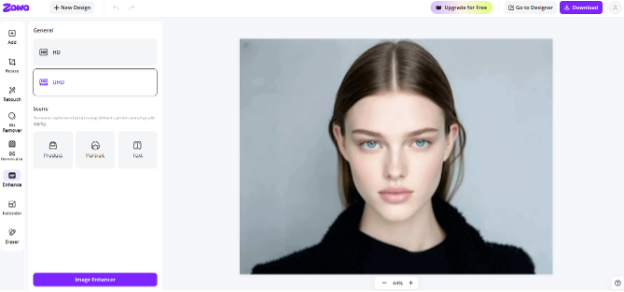
An excellent, well-defined image has the power to make or break the design. Software such as Zawa’s image enhancer, for example, supports the beautification of pictures by making details more precise, lessening noise, brightening or changing the contrast, and even increasing resolution for as many as 20 images simultaneously.
Why Image Enhancers Are Essential for Designers
Raising the overall level of design
Image enhancers are a great way to get better clarity and sharpness in the image, and this leads to the improvement of the overall look of the image, which results in the image looking more professional. Enhancing images also helps typography to be easily recognizable, so text and images can be combined without any problems.
Saving time in the process
One of the advantages of an image enhancer is that it helps reduce the time spent editing the images manually in complicated software. Designers can make quick fixes on images, which is most of the time very helpful when there is a client revision or a very tight deadline.
Increasing cross-platform uniformity
Images that have been enhanced will be as good as before on any platform, be it on a mobile, a desktop, or even in print. This means that your design will keep its quality no matter where it is seen.
Helping artists to be flexible in their work
Image enhancers make it possible for designers to use old or low-quality assets again. They also give artists the opportunity to try out new things without having to worry about the quality of the design being compromised.
The Role of HD Conversion in Design Projects
High-resolution visuals are a key element of contemporary design since they render images more vivid, accurate, and impeccable. They come in handy particularly for online store product images, social networking visuals, and presentation slides, where sharpness may be a decisive factor for attracting and impressing the target audience.
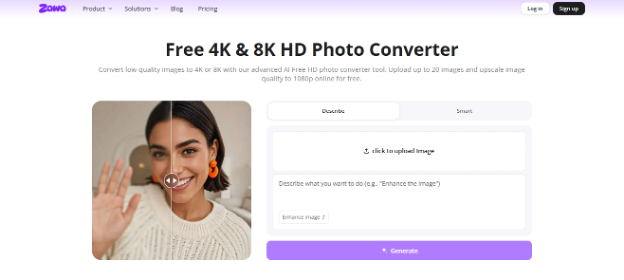
With the help of a Zawa HD photo converter, designers can enhance image quality. It can upscale low-res images to 1080P, 4K, or even 8K, performing noise reduction, enhancing image details, adjusting color tones, and batch-processing image files.
Combining Font Design and Image Enhancement: Best Practices
Keep visual balance
Check that the font styles and weights you select resonate visually to the clarity of your pictures. For instance, a thin font might be invisible on a highly detailed image, whereas a strong font would be the most effective with a sharply delineated picture.
Give readability the first place
Don’t forget to separate texts from the visually amplified images. High contrast between the text and the background ensures that your design is both readable and visually engaging.
Customize for various platforms
Meanwhile, remember to change both the image and the typography quality according to the platform you are designing for. Your pictures and typography should be the best possible, both on websites, in print, and on social networks.
Make enhancements a tool
Don’t ever over-sharpen or let your photos appear unnatural. Tiny tweaks can make the shots more beautiful and professional at the same time so that they complement the entire design rather than dominating it.
Future of Design Tools: AI and Automation
These days, AI is playing a major role in aiding designers to improve their efficiency and work their way intelligently. Automation is reducing technical barriers, making it easier to achieve professional results without complex software.
In years to come, it is highly likely that designers will rely very much on the use of intelligent tools, and the integration of typeface and photo-retouching features might become a fundamental part of any designer’s toolkit.
Conclusion
Even the most powerful typography can’t make a design unique all by itself in today’s design environment. Great pictures are just as essential, and Zawa’s Image Enhancer and HD Photo Converter enable a designer to easily sharpen details, reduce noise, and increase resolution. By mixing fancy fonts with visually enhanced images, a designer will be able to make professional and steady-looking visuals, save time, and keep quality across web, print, and social media. Utilizing these AI-driven tools has become necessary for creating modern, highly impactful designs.