
Winning the Pitch: How to Clean Distracting Watermarks from Draft Images for Flawless Client Mockups
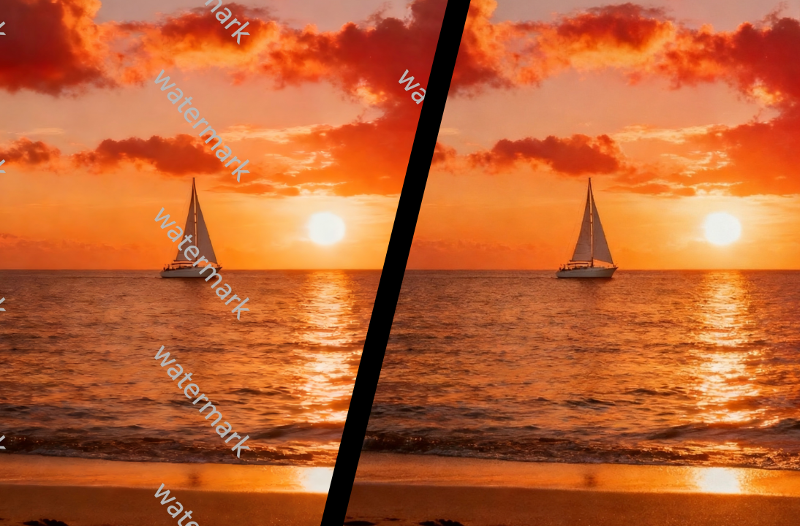
You’ve been there before. You’re in a high-stakes client meeting, presenting a mockup that you poured hours into. The design is solid, the copy is sharp, but the client’s eyes keep drifting to the big, ugly watermark plastered across the hero image. That distracting logo or “DRAFT” text breaks the spell, pulling everyone out of the vision you’re trying to sell. Instead of seeing a polished final product, they see a work in progress, and their confidence wavers.
Distracting watermarks on stock photos or draft assets can undermine your professionalism. They disrupt the visual harmony of your design and can make an otherwise brilliant presentation look amateur. To win a pitch, you need to sell a complete vision, not a collection of watermarked parts. Thankfully, removing these visual roadblocks is easier than ever, allowing you to present flawless mockups that let your work truly shine.
The Graphic Designer’s Unprofessional Mockup
Scenario: A freelance designer is building a website concept for a new luxury skincare brand. The client wants a clean, minimalist aesthetic, and the designer has found the perfect set of stock photos to capture this vibe. The problem? Every single image is covered in a repeating, semi-transparent watermark from the stock photo service.
Sending the mockup with these distractions would be a disaster. The client wouldn’t be able to appreciate the elegant typography or the thoughtful layout. Their focus would be stuck on the watermarks, making the entire project feel premature and unprofessional. It creates a subtle doubt in the client’s mind about the designer’s attention to detail. This is a critical moment where a great first impression can secure a long-term contract. With the right tools, this problem disappears. A dedicated Watermark Remover can intelligently erase these marks in seconds.
Benefits: By presenting a clean, watermark-free mockup, the designer completely changes the conversation. The client can now immerse themselves in the proposed design and visualize their brand on a live website. It shows that the designer is thorough and invested in presenting a polished vision. This builds trust and helps the client approve the design faster, confident that they are in capable hands.
The Agency’s High-Stakes Campaign Pitch
Scenario: A marketing agency is pitching a comprehensive social media campaign to a major beverage company. Their presentation deck is filled with concept ads showcasing the new campaign slogan and visual identity. They’re using powerful, dynamic stock images to convey a sense of energy and excitement. However, each image has a prominent stock photo logo in the corner.
During the pitch, the client’s feedback is, “It’s hard to see our product in these images.” The watermarks are competing for attention with the agency’s actual creative work. The presentation feels less like a professional proposal and more like a student project. This is where an AI Photo Editor becomes essential not just for removing watermarks, but for making other minor tweaks to perfect the visual.
Benefits: A clean presentation deck helps the agency sell the dream, not the process. When all distracting elements are removed, the client can see the campaign as their customers would. The concept feels tangible and ready to launch. This small step elevates the entire pitch, shifting the client’s focus from the stock assets to the strength of the campaign idea itself. It’s a simple move that can mean the difference between winning a huge account or going back to the drawing board.
The Real Estate Agent’s Luxury Listing
Scenario: A real estate agent is preparing a digital brochure and online listing for a multi-million dollar home. They’ve hired a virtual staging company to add digital furniture to the empty rooms, making the property feel more inviting. Unfortunately, some of the digital assets, like a designer couch or a piece of art, have faint but noticeable brand watermarks on them.
In the luxury market, perception is everything. These tiny, out-of-place logos can shatter the illusion of a perfect, high-end living space. Potential buyers with a keen eye might spot these imperfections, making the listing feel less premium. It introduces a small element of artificiality that can be a major turn-off for buyers in this price bracket. They expect perfection, and a watermarked image is far from it.
Benefits: Removing these subtle watermarks ensures the property is presented in its best possible light. The virtual staging looks completely natural, allowing buyers to envision themselves living in the space without any distractions. For high-value properties, a flawless visual presentation helps justify the asking price and attracts serious, qualified buyers. It’s a detail that contributes to a faster, more profitable sale.
Practical Workflow: From Watermarked to Flawless
Achieving a clean, professional look for your mockups doesn’t require advanced photo editing skills. Modern AI-powered tools have made the process incredibly simple. You can transform your draft images from cluttered to clean in just a few minutes.
Here’s a straightforward workflow you can follow:
- Choose Your Source Image: Start with the highest resolution version of the stock photo or draft image you have. A high-quality source file will always produce a better and cleaner final result.
- Upload to an AI Tool: Navigate to a web-based watermark removal tool. Most feature a simple drag-and-drop interface, so you can get your image into the system without any hassle.
- Select the Watermark: Use the provided brush or selection tool to highlight the watermark you want to remove. You just need to paint over the text or logo. The AI is smart enough to understand the context even with a rough selection.
- Process and Download: Click the “Remove” button and let the AI work. It analyzes the pixels surrounding the watermark and intelligently fills in the space, matching the background textures, colors, and lighting. The process usually takes just a few seconds.
- Review and Integrate: Download the clean image. Give it a quick look to ensure everything is perfect, then place it directly into your website mockup, presentation slide, or design file.
This simple process can have a huge impact on how clients perceive your work.
| Feature | Impact on Client Presentation |
| AI-Powered Removal | Saves valuable time by automatically and intelligently erasing watermarks. |
| Batch Processing | Cleans multiple images for a large project at once, ensuring visual consistency. |
| High-Resolution Output | Preserves the original image quality, keeping mockups looking sharp and professional. |
| User-Friendly Interface | Requires no technical skills, allowing you to focus on design instead of editing. |
Conclusion
In a competitive market, the details make all the difference. Watermarks on draft images are more than just a minor annoyance; they are a barrier between your creative vision and your client’s understanding. They shout “unfinished” when you want to convey “flawless.” Removing them is a non-negotiable step for any professional who wants to win bigger and better projects.
By integrating a quick and easy watermark removal process into your workflow, you ensure your presentations are always polished, professional, and persuasive. Stop letting distracting logos undermine your hard work. Present a clear, uninterrupted vision, and give your clients every reason to say yes.