
Mastering the Art of Trendy Editing: Techniques and Tips for Creating Stylish Videos

>> Download Mastering the Art of Trendy Editing: Techniques and Tips for Creating Stylish Videos for free professional usage
Source: CapCut.Com
Do you want to create stylish videos that will stand out from the crowd? If so, you need to master the art of trendy editing. With a little bit of know-how, you can create videos that are both visually appealing and engaging.
Videos have become a dominant force in the realm of digital content, captivating viewers and shaping online experiences. Whether you’re an aspiring filmmaker, a vlogger, or a social media enthusiast, the ability to craft stylish and visually appealing videos is a valuable skill.
In this article, we will show you some of the most popular editing techniques and tips for creating trendy videos. We will also introduce you to CapCut, a powerful free online video editing platform that makes it easy to create professional-looking videos.
Starting Strong: Captivating Introductions

Source: CapCut.Com
First impressions matter, and in the world of video content, a captivating introduction can make all the difference. It sets the tone, grabs the viewer’s attention, and entices them to keep watching. With CapCut, you have the power to create introductions that leave a lasting impact.
To start strong, consider incorporating visually striking scenes, stunning visuals, or intriguing text animations. Grab your audience’s attention with a thought-provoking quote or an engaging question. Experiment with smooth transitions, eye-catching effects, and attention-grabbing music to add an extra layer of allure.
Remember, brevity is key. Keep your introduction concise while packing it with excitement and anticipation. In just a few seconds, you can hook your viewers and make them eager to discover what lies ahead. CapCut offers a range of features and video templates to help you create introductions that leave a lasting impression.
Dynamic Transitions: Seamless Scene Changes
Source: CapCut.Com
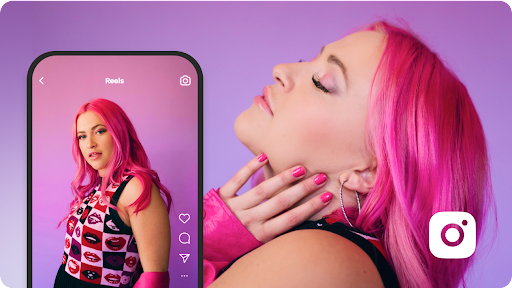
Smooth transitions are the secret ingredient to seamless scene changes in your videos, elevating the overall viewing experience. With CapCut, you can effortlessly create dynamic transitions that make your video flow like a work of art.
Experiment with a variety of transition effects such as fades, wipes, zoom-ins, or even more creative options like split-screen or morph transitions. Each transition brings a unique visual impact to your video and can be used to convey emotions, emphasize key moments, or create a sense of continuity between different scenes.
However, it’s important to use transitions judiciously. Too many transitions can overwhelm the viewer and distract from the content itself. Aim for smooth and natural transitions that enhance the storytelling without drawing excessive attention.
CapCut’s intuitive interface allows you to easily apply and customize transitions. You can adjust their duration, timing, and even add additional effects for a truly personalized touch. Take your viewers on a seamless journey through your video with captivating transitions that keep them engaged from start to finish.
Enhancing the Visual Appeal: Filters and Color Grading

Source: CapCut.Com
Enhancing the visual appeal of your videos is essential to create a captivating viewing experience. CapCut offers a wide range of tools and features to help you achieve this, including filters, color grading, and even a video background remover.
Filters are a quick and effective way to transform the mood and aesthetics of your videos. CapCut provides a diverse collection of filters, each with its own unique style and vibe. From vintage and cinematic looks to vibrant and bold colors, you can experiment with different filters to find the perfect match for your video.
Color grading allows you to fine-tune the colors in your videos, giving them a cohesive and professional look. Adjusting brightness, contrast, saturation, and temperature can create a specific atmosphere or evoke certain emotions. With CapCut’s intuitive color grading tools, you can easily enhance the visual appeal of your videos and maintain consistency throughout.
Additionally, CapCut offers a video background remover tool, allowing you to remove the background from a specific clip. This feature opens up creative possibilities by enabling you to overlay the clip on a different background or integrate it seamlessly into other footage.
Telling a Story: Text Overlays and Subtitles

Source: CapCut.Com
Telling a compelling story is at the heart of engaging video content. With CapCut, you have a range of tools, such as text overlays and subtitles, to add depth and context to your videos.
Text overlays can serve various purposes, from introducing sections or highlighting key points to adding witty captions or engaging titles. CapCut offers customizable text options, including different fonts, sizes, colors, and animations. Experimenting with text overlays allows you to enhance the storytelling aspect of your videos and convey information in a visually appealing way.
Subtitles play a crucial role in making your content accessible to a wider audience. They ensure that viewers with hearing impairments can still enjoy your videos, and they also help viewers who prefer to watch videos with subtitles. CapCut allows you to easily add and customize subtitles, making your videos more inclusive and user-friendly.
Elevating the Sound: Music and Audio Effects
Source: CapCut.Com
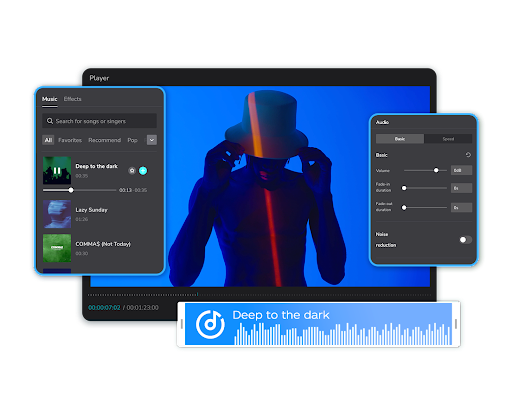
Music sets the mood and creates an emotional connection with your audience. CapCut offers a library of royalty-free music spanning various genres and styles. Choose a track that complements the tone and message of your video, whether it’s an upbeat melody for a lively vlog or a gentle piano piece for a heartfelt moment. Adjust the volume levels to ensure a harmonious blend between the music and other audio elements.
Audio effects can bring your videos to life, adding depth and immersive quality. CapCut provides a selection of audio effects, including echo, reverb, and pitch modulation. Experiment with these effects to create unique sounds that enhance the storytelling or create a specific atmosphere.
Conclusion
Mastering the art of trendy video editing with CapCut opens up endless creative possibilities. Embrace the art of editing and bring your vision to life!