
From Icons to Information: Typography for Product Features People Actually Understand

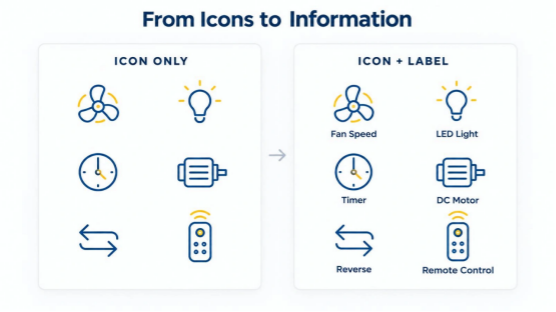
A product page can look polished and still leave shoppers guessing. A clock symbol might indicate a sleep timer, delayed start or scheduled operation. A circular arrow could describe reversible airflow, an automatic cycle or something else entirely. Even the familiar lightbulb icon does not reveal whether a light simply switches on or supports brightness adjustment.
The solution is not to abandon icons. It is to give them a clear relationship with words, numbers and the information people need to make decisions. Thoughtful typography turns a collection of features into an understandable explanation of what a product does—and, just as importantly, what it does not do.
Why Icons Alone Can Fail to Explain Product Features
Icons are useful because they make dense interfaces easier to scan. Their weakness is that recognition and understanding are different things. A shopper may recognize a fan-shaped symbol immediately but still be unsure whether it represents motor speed, a natural-breeze setting or ventilation. The meaning becomes even less obvious when one symbol is reused across unrelated products.
Labels reduce that ambiguity. “Timer” provides more information than a clock alone; “1/4/8-Hour Timer,” when accurate for the model, explains the available settings. Clear wording also helps people who use interfaces in a second language or are unfamiliar with the product category. Common symbols such as search and shopping-cart icons may need less support in familiar contexts, but specialized features deserve explicit descriptions.
An icon should serve as a visual shortcut, not a test of the customer’s ability to guess a designer’s intention.
Build an Information Hierarchy Before Choosing a Font
Before selecting a typeface, decide what visitors need to learn first. On a product listing, the product name and primary differences should be evident before shoppers open a detailed specification sheet. On the product page, the hierarchy should lead from identification to useful features and then to installation or technical qualifications.
A broad selection of ceiling fans with lights illustrates the challenge. Buyers may compare fan diameter, mounting style, lighting configuration and control options across visually similar products. If every attribute appears in the same weight, size and crowded line, none stands out as an easy point of comparison.
Keep the category or model name prominent, place a few decision-making attributes directly beneath it, and move detailed measurements into a consistent specifications area. A clear order is more useful than simply making everything bold.
Three Typography Levels That Make Features Easier to Scan
Feature sections work well when they distinguish the feature name, the practical explanation and the verifiable value. The name answers “What is it?” The explanation answers “What does it do?” The value answers “What exactly is provided?” These layers are related, but they are not interchangeable.
For example, “Remote Control” is a useful feature name. “Adjust supported settings without using the wall switch” is a concise explanation. “Six fan speeds,” where confirmed by a specific model, is a measurable attribute. A page that replaces all three with “Ultimate Smart Comfort” may sound appealing while communicating little.
Typography can make these distinctions visible without resorting to three different fonts. Use a clear, moderately emphasized heading; comfortable body text for the explanation; and a consistent treatment for data values. Spacing, alignment and contrast create hierarchy alongside font size. When a feature requires a caveat—such as a setting available on only certain models—keep that caveat adjacent to the claim rather than hiding it far below the card.
Make Numbers, Units, and Technical Specifications Clear
Numbers can be harder to compare than words when their labels are inconsistent. “52in,” “52-inch” and “52 INCHES” might all refer to the same size, but switching between formats slows scanning. An unexplained “18W” leaves readers unsure whether it identifies motor input, a light source or another electrical rating.
The solution is a repeatable label-and-value pattern. Write the attribute first, then the specific value: “Fan diameter — 52 in”; “LED light power — 18 W”; “Fan speeds — 6.” These are illustrative examples, not a combined specification for any particular product. Avoid treating the presence of a DC motor as proof of a fixed speed count or treating selectable color temperatures as evidence of dimming.
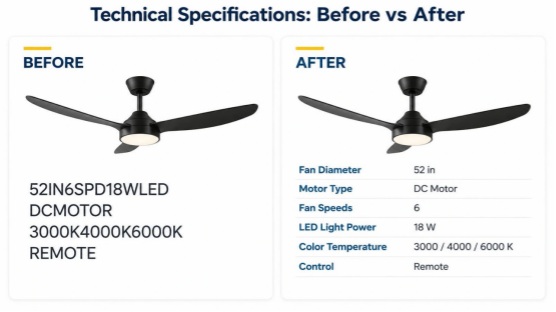
Collections such as DC ceiling fans with lights show why this matters. Motor type, blade span, lighting power and control functions describe different product characteristics. They should be clearly named and verified for each model rather than compressed into strings of abbreviations.
For comparison tables, aligned columns and tabular numerals can make values easier to follow. A monospaced typeface is one possibility, but it is not essential: many proportional fonts provide tabular-number features. Above all, retain correct units, readable spacing and the context needed to interpret each figure.
Choosing Typefaces for Small Labels and Functional Interfaces
Compact labels need typefaces with distinguishable characters at realistic viewing sizes. The difference between a capital I, a lowercase l and the numeral 1 may seem minor in a large display specimen, yet becomes important in model codes. The same is true of the letter O and the number 0. Designers should test these combinations directly instead of relying only on a font’s visual personality.
DIN-inspired lettering is often associated with structured, utilitarian information. FontsArena’s guide to free DIN fonts and alternatives offers a useful starting point for exploring that family. Neutral sans-serif choices can also work well, provided their figures, punctuation and small-size rendering remain legible. None should be selected purely because it has a reputation for being “technical.”
Test labels at the actual size used in a product card, a mobile screen and a printed quick-start guide. Check whether similar characters remain distinct, whether bold weights close up smaller shapes, and whether long labels wrap awkwardly. The best choice is the one that remains understandable in use.
From Icons to Words: Making Remote Controls Easier to Understand
A remote control provides a useful example of what happens when visual symbols carry too much responsibility. A fan icon may be intuitive, yet it cannot on its own explain whether a button cycles through speeds, turns the fan off or activates an automatic mode. A circular arrow is especially ambiguous unless the label specifies its function.
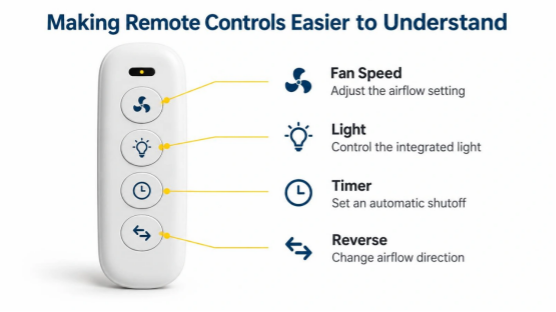
When presenting ceiling fans with lights and remote control, product information may need to explain lighting, timer, fan-speed and reverse-operation controls. Those functions vary by model. The interface should not imply that every control shown in an illustration is available on every product.
Pair an icon with a plain-language name such as “Fan Speed” or “Light On/Off,” followed by a short explanation only when it adds information. Use the same terminology in the product description, control diagram and instruction manual. If a symbol requires a long paragraph to decode, the icon may not be doing useful work. Labels should clarify the action, not repeat a vague marketing promise.
Make Feature Typography Work on Mobile and for Accessibility
A feature grid that looks balanced on a wide monitor can become cramped on a phone. Four icons in a row may force labels into tiny text, while a long phrase can wrap beneath the wrong symbol. Adapting the layout is often more effective than shrinking every font until the content fits.
Allow fewer columns on narrow screens, keep each label visually attached to its icon, and preserve enough spacing to distinguish neighboring features. When specifications form a table, use a mobile-friendly arrangement that retains the association between each value and its label. A two-column layout or a stacked key–value list can work better than a compressed six-column grid.
Accessibility needs more than a clean appearance. Interactive icon buttons require programmatic accessible names, and information should not depend on color alone. Adequate text contrast, usable touch targets and support for text enlargement should be tested in the actual interface. Visible words can improve comprehension for many people, while the accessible name ensures assistive technology can identify an action. The two should describe the same function.
Test Whether People Can Actually Understand the Features
A product feature section should be evaluated by whether readers can answer questions, not only by how attractive it looks. One practical test is to prepare two versions of the same product information. Version A uses icons and compact abbreviations. Version B retains supportive icons but adds concise labels, separates the main specifications and makes qualifications easy to find. Keep the underlying product facts identical so the layout is what changes.
Ask a small group of people unfamiliar with the product to locate the fan’s diameter, identify its speed settings, determine whether the light is dimmable and find out how reverse operation is controlled. Use only questions that the selected test model’s official documentation can answer. Record whether participants are correct, how long they take and where they hesitate. Then ask which word or symbol caused uncertainty.
If readers mistake color-temperature selection for dimming, rewrite the lighting label. If they cannot distinguish a timer from a scheduling function, change the button description. These observations provide a more useful design brief than a preference vote between two beautiful layouts.
Finally, check the complete buying journey. A term used on a collection page should mean the same thing on the product page, packing insert and user manual. Clarity should survive every step, not disappear once the shopper clicks through.
Clarity Is the Real Measure of Good Product Typography
Effective product typography rarely calls attention to itself. It gives shoppers a reliable way to identify a feature, understand its purpose and verify its limits. Icons can accelerate recognition, but precise language, structured numbers and accessible layouts make the information dependable. When people can compare complex products without guessing, the design has done more than decorate the page: it has made the product easier to understand.